
Transaction Identity Block
| Attribute | Description |
| Transaction Name | Planning Schedule with Release Capability |
| X12 Transaction Set | 830 |
| Functional Group | PS - Planning Schedule with Release Capability (830) |
| Industry Usage | Automotive, Manufacturing, Grocery, Retail, CPFR Supply Chains |
| Primary Purpose | Communicate demand forecasts and release schedules between buyers and suppliers |
| Common Industries | Automotive, Retail, Manufacturing |
| Typical Frequency | Weekly or Monthly |
| Typical Sender | Manufacturer, Retailer, Distributor |
| Typical Receiver | Supplier, Contract Manufacturer, Component Vendor |
| Common Preceding Transactions | EDI 846 Inventory Inquiry/Advice, EDI 850 Purchase Order |
| Common Following Transactions | EDI 855 Purchase Order Acknowledgment, EDI 856 Advance Ship Notice, EDI 810 Invoice |
| Standard Version | ANSI X12 v4010 (commonly used in automotive and retail) |
What Is the EDI 830?
The EDI 830 Planning Schedule with Release Capability is an ANSI X12 transaction used by buyers to communicate demand forecasts and release schedules to suppliers. It provides projected quantities, delivery timing, and planning information so suppliers can align production, inventory, and logistics operations with anticipated demand.
What Does the EDI 830 Do?
The EDI 830 communicates forecasted demand and scheduled release quantities for products across defined time horizons. The document may include long-term forecast buckets (weekly, monthly, quarterly) and firm short-term delivery schedules that function as order releases against existing purchase orders. The EDI 830 therefore acts as a hybrid planning document capable of supporting:
- Demand forecasting
- Production planning
- Supplier capacity planning
- Shipment scheduling
- Just in time (JIT) - blanket and release
- Continuous Planning Forecasting and Replenishment (CPFR)
Suppliers use the information in the planning schedule to ensure that materials, labor, and transportation capacity align with the buyer’s projected requirements.
Who Uses the EDI 830?
The EDI 830 is used by organizations that operate forecast-driven supply chains, particularly where production planning must occur weeks or months ahead of shipment. Typical industries include:
| Industry | Use Case |
| Automotive Manufacturing | Production release schedules for suppliers |
| Grocery & Retail | Vendor demand planning and replenishment |
| Consumer Goods | Distribution planning and inventory positioning |
| Industrial Manufacturing | Component and raw material planning |
| Pharmaceutical Distribution | Forecasting for regulated supply chains |
Major enterprises using the EDI 830 include organizations such as automotive manufacturers, retailers, and large distributors operating under AIAG, UCS, VICS, or VDA EDI frameworks.
When Is the EDI 830 Required?
Organizations typically issue the EDI 830 on a scheduled cadence, often:
- Weekly
- Bi-weekly
- Monthly
Frequency depends on the supply chain model. Automotive supply chains commonly transmit the document weekly to ensure suppliers receive updated production schedules.
Is the EDI 830 Mandated Under Regulation?
No, the EDI 830 is not directly mandated by regulation, but it is commonly required by large manufacturers and retailers through trading partner agreements and within industries such as OEM automotive manufacturers who frequently require the 830 and the following standards
- AIAG EDI Guidelines
- Retail VICS (CPFR) EDI Standards
- The German Association of the Automotive Industry (VDA)
- Verband der Automobilindustrie e.V.
- Industry-specific companion guides
How Does the EDI 830 Work in the Business Workflow?
The EDI 830 integrates demand forecasting with procurement and supply chain planning.
Forecast Planning Lifecycle
Upstream Transactions
Positioning the EDI 830 at the center of the lifecycle, upstream transactions are those transactions that organizations use to synchronize item and location data, collect pricing detail (e.g., catalog data), place orders, receive and track shipments, and collect inventory data, information, and finally generate the EDI 830. The following upstream transactions typically precede the EDI 830:
| Transaction | Name | Purpose | Why It Occurs Before the 830 |
| EDI 816 | Organizational Relationships Transaction | Communicates information about corporate hierarchies, subsidiaries, divisions, and locations with trading partners. | Ensures both parties share a consistent understanding of locations before forecast schedules are issued. |
| EDI 832 | Price / Sales Catalog | Communicates product catalog data including item numbers, pricing, packaging, and descriptions. | Ensures both parties share a consistent product master before forecast schedules are issued. |
| EDI 846 | Inventory Inquiry / Advice | Provides inventory availability and stock levels from the supplier or distributor. | Buyers use inventory visibility to refine forecast demand schedules communicated via the 830. |
| EDI 850 | Purchase Order | Establishes the contractual purchase order relationship between buyer and supplier. | The 830 often releases demand against an existing blanket or planned purchase order. |
| EDI 855 | Purchase Order Acknowledgment | Confirms supplier acceptance of a purchase order and validates terms. | Ensures supplier commitment before forecasts are transmitted. |
| EDI 888 / Planning Agreements (varies by industry) | Item Maintenance or Product Data | Synchronizes item identifiers, packaging, or engineering attributes. | Prevents product identifier mismatches in forecast schedules. |
Downstream Transactions
Positioning the EDI 830 at the center of the lifecycle, downstream transactions respond to rolling forecasts and shipment release schedules by operationalizing the forecast, turning planned demand into shipment execution, delivery visibility, and financial settlement.
| Transaction | Name | Primary Purpose | Why It Follows the 830 |
| EDI 855 | Purchase Order Acknowledgment | Confirms supplier acceptance of order releases or forecast commitments. | Validates that the supplier can meet forecast demand. |
| EDI 856 | Advance Ship Notice (ASN) | Announces shipment contents and delivery timing. | Enables warehouse receiving preparation. |
| EDI 862 | Shipping Schedule | Provides short-term, highly detailed shipping instructions. | Refines the longer-term forecast sent in the 830. |
| EDI 214 | Transportation Carrier Shipment Status | Communicates in-transit shipment status updates. | Provides visibility during transportation. |
| EDI 861 | Receiving Advice / Acceptance | Confirms receipt and acceptance of goods. | Validates shipment arrival and quantities received. |
| EDI 810 | Invoice | Requests payment for shipped goods. | Initiates financial settlement. |
| EDI 820 | Payment Order / Remittance Advice | Communicates payment details. | Completes financial reconciliation. |
End-to-End Workflow Example
- Buyer creates a blanket PO (850)
- Supplier acknowledges via EDI 855.
- Buyer generates demand forecast.
- Buyer communicates demand forecast
- Buyer may release short-term release instructions
- Forecast is transmitted to suppliers via EDI 830.
- Supplier confirms commitment
- Supplier acknowledges via EDI 855 or begins fulfillment.
- Supplier plans production and logistics.
- Shipment details follow via EDI 856.
- Transportation tracking
- Delivery confirmation
- Supplier requests financial settlement via EDI 810.
- Buyer communicates remittance via EDI 820
- Supplier acknowledges EDI 820 Payment settlement
Industry-Specific Workflow Variations
Different industries interpret the EDI 830 differently:
| Industry | Forecast Model |
| Automotive | Weekly production schedules with firm releases |
| Retail | Demand forecasting tied to promotional planning |
| Grocery | CPFR-driven replenishment forecasting |
| Industrial | Long-horizon capacity planning |
Cross-Standard Canonical Mapping
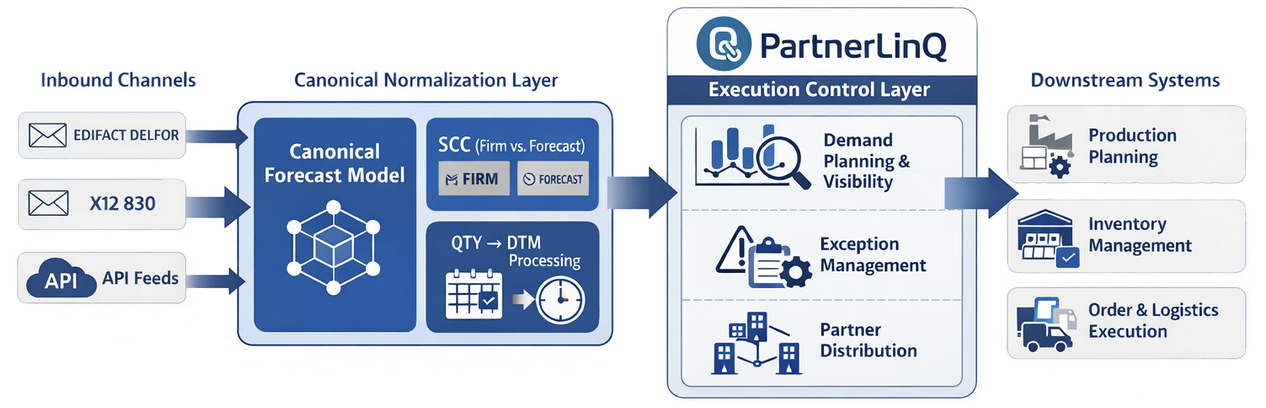
Below is a Cross-Standard Canonical Forecast Mapping that aligns ANSI X12 scheduling transactions (including the EDI 830) with equivalent forecasting and planning messages used in EDIFACT, VDA, AIAG automotive standards, ODETTE, and SAP IDoc ecosystems.
This type of mapping is useful for multi-standard EDI environments, especially in automotive and global manufacturing where suppliers must interpret forecasts across multiple regional standards.
| Canonical Function | X12 (ANSI ASC X12) | EDIFACT | VDA | AIAG | ODETTE | SAP IDoc |
| Planning Forecast / Planning Schedule | 830 Planning Schedule with Release Capability | DELFOR Delivery Forecast | VDA 4905 Delivery Forecast | AIAG 830 Planning Schedule | ODETTE DELFOR | DELFOR02 |
| Supplier Capacity Authorization / Resource Commitment | 830 (ATH Segment) | DELFOR | VDA 4905 | AIAG Forecast Planning | DELFOR | DELFOR02 |
| Material Release / Delivery Authorization | 830 Release Capability | DELFOR Release | VDA 4985 Material Release | AIAG Release Forecast | DELFOR | DELFOR02 |
| Delivery Instruction / Logistics Call-Off | 862 Shipping Schedule | DELJIT | VDA 4987 Delivery Instruction | AIAG JIT Delivery | DELJIT | DELJIT |
| Short-Term Shipping Schedule | 862 Shipping Schedule | DELJIT Delivery Just-In-Time | VDA 4915 JIT Delivery Call-Off | AIAG 862 | DELJIT | DELJIT |
| Sequenced JIT Production Call-Off | 866 Production Sequence | DELJIT (Sequenced) | VDA 4913 Sequence Call-Off | AIAG 866 | SEQJIT | DELJIT / JITCALL |
Across all standards, the EDI 830 occupies the same canonical role as:
| Standard | Forecast Message |
| X12 | 830 |
| EDIFACT | DELFOR |
| VDA | 4905 |
| AIAG | 830 |
| ODETTE | DELFOR |
| SAP | DELFOR02 IDoc |
These documents serve as the primary supplier forecast message in global manufacturing ecosystems.
EDI 830 vs Other Forecast Messages
Transaction | Purpose | Forecast Horizon |
EDI 830 | Long-term planning schedule | Weeks or months |
EDI 862 | Short-term shipping schedule | Days |
DELFOR | EDIFACT delivery forecast | Weeks or months |
VDA 4905 | Automotive delivery forecast | Weeks |
VDA 4915 | JIT delivery call-off | Hours or days |
How Does PartnerLinQ Use the 830?
PartnerLinQ supports the EDI 830 as part of its Unified Execution Layer for supply chain collaboration. The platform enables:
- Forecast ingestion and normalization
- Trading partner onboarding
- Schedule updates and exception monitoring
- Integration with ERP and manufacturing systems
PartnerLinQ also standardizes delimiters used in EDI transmissions to ensure compatibility across trading partners.
Where Is the EDI 830 Used?
The transaction appears primarily in forecast-driven manufacturing and retail supply chains, including:
Automotive assembly operations
Grocery distribution
Mass merchandise retail
Industrial component manufacturing
Are there Industry-Specific Responses to the EDI 830?
The EDI 830 itself usually does not require a direct response transaction. However, trading partners often reply using:
| Response Transaction | Purpose |
| EDI 855 | Confirm forecast-based order releases |
| EDI 846 | Provide inventory availability |
| EDI 997 / 999 | Technical acknowledgment |
What Is the Purpose, Key Features, and Business Use Cases of the EDI 830?
The EDI 830 Planning Schedule with Release Capability communicates long-term demand forecasts and short-term shipment releases from buyers to suppliers. The 830 document enables production planning, inventory management, and logistics coordination by sharing forecast quantities, delivery schedules, and resource authorization details, allowing suppliers to align manufacturing and distribution activities with projected customer demand.
Operational Purpose
The primary purpose of the EDI 830 is to synchronize buyer demand forecasts with supplier production and logistics planning. The EDI 830 communicates forecast demand and delivery schedules so suppliers can align production planning with buyer expectations. The transaction allows organizations to communicate:
- Forecast demand over defined time horizons
- Planned shipment or delivery schedules
- Resource commitments for labor or materials
- Purchase order release schedules
In many industries, the EDI 830 acts as a rolling forecast mechanism, enabling suppliers to adjust production capacity, labor planning, and material procurement based on projected demand.
Unlike a traditional purchase order, the EDI 830 often references an existing blanket or planned purchase order, providing forecast visibility without requiring discrete orders for each shipment.
Key Features
| Feature | Description |
| Rolling Forecast Horizon | Communicates demand projections across weekly, monthly, or quarterly forecast buckets. |
| Release Capability | Allows buyers to authorize suppliers to commit resources or prepare shipments based on forecasted demand. |
| Multi-Location Forecasting | Enables forecasts by product and location or by location and product. |
| Forecast Schedule Segments | Uses FST segments to transmit forecast quantities and timing. |
| Delivery Pattern Definition | Uses SDP segments to define recurring delivery schedules. |
| Shipment History Integration | SHP segments may communicate shipped or received quantities. |
| Resource Authorization | ATH segments authorize suppliers to commit labor or materials. |
| Transportation Terms | FOB segments specify shipping responsibility and freight terms. |
Business Use Cases
| Use Case | Description |
| Supplier Production Planning | Suppliers use forecast schedules to plan capacity, manufacturing scheduling, and labor allocation. |
| Inventory Planning | Forecast quantities allow suppliers to maintain appropriate stock positions and enable replenishment. |
| Supplier Managed Inventory (SMI) | Suppliers manage inventory replenishment using buyer forecast data. |
| Logistics Scheduling | Delivery patterns enable transportation planning and warehouse scheduling. |
| CPFR Programs | Supports Collaborative Planning Forecasting and Replenishment between trading partners. |
| Automotive Production Scheduling | Automotive OEMs transmit rolling production forecasts to Tier-1 suppliers. |
Industry Applications
| Industry | Application |
| Automotive Manufacturing | Production release schedules for Tier-1 and component suppliers |
| Consumer Goods (CPG) | Distribution center demand forecasting |
| Consumer Electronics | Component procurement forecasting |
| Grocery & Retail | Vendor replenishment planning, forecasting and replenishment (VICS CPFR) |
| Healthcare Distribution | Forecast-driven inventory management |
| Industrial Manufacturing | Raw material and component planning |
Large retailers and manufacturers frequently use the EDI 830 to coordinate supply chain planning with suppliers across multiple facilities.
Operational Visibility

The EDI 830 enables real-time collaboration between buyers and suppliers and improves supply chain transparency by allowing suppliers to share/view future demand projections electronically. Visibility into forecast schedules enables suppliers to anticipate production requirements and respond proactively to demand fluctuations and forecast visibility allows organizations to detect:
- Demand spikes
- Supply shortages
- Production bottlenecks
- Transportation capacity constraints
Compliance Reporting
Many manufacturers and retailers require suppliers to support the EDI 830 as part of their trading partner compliance programs. The transaction enables buyers to enforce supply chain planning requirements and ensure suppliers have enough lead time to meet demand commitments. Partners frequently incorporate the 830 into supply chain contracts not to mention planning processes.
Financial Reconciliation
While the EDI 830 is not a financial transaction, it does support financial planning by providing early visibility into procurement demand and production requirements. Organizations use forecast data to anticipate purchasing costs, production expenses, and supply chain budgets.
Supply Chain Coordination
The EDI 830 document synchronizes demand forecasts with logistics and manufacturing planning and connects multiple supply chain functions:
| Supply Chain Function | Impact |
| Procurement | Aligns supplier production schedules |
| Manufacturing | Enables capacity planning |
| Logistics | Supports transportation planning |
| Inventory Management | Reduces stockouts and excess inventory |
This coordination helps maintain consistent supply chain operations across trading partners.
Exception Management
Forecast updates transmitted via the EDI 830 allow suppliers to detect demand shifts and respond to changes in demand proactively. When forecast schedules change, suppliers can adjust production plans, procurement orders, and logistics arrangements. Common exceptions managed through the EDI 830 include:
- Forecast quantity changes
- Delivery date adjustments
- Production capacity limitations
- Inventory shortages
What Information Is Required in the EDI 830?
The EDI 830 Planning Schedule with Release Capability requires forecast schedule data, item identifiers, forecast horizon dates, location identifiers, and delivery pattern information. These elements enable suppliers to interpret buyer demand forecasts, plan production and inventory, and schedule deliveries according to projected consumption and shipping schedules
Quick Segment Reference
The EDI 830 includes several segments that collectively define the forecast envelope, item demand schedules, and delivery instructions.
| Segment | Name | Purpose |
| ST | Transaction Set Header | Identifies the start of the EDI 830 transaction |
| BFR | Beginning Segment for Planning Schedule | Defines forecast envelope dates and schedule purpose |
| REF | Reference Identification | Provides external identifiers such as purchase orders |
| FOB | F.O.B. Related Instructions | Defines transportation terms |
| N1/N2/N3/N4 | Name and Address | Identifies buyer, supplier, or ship-to locations |
| LIN | Item Identification | Identifies the product or SKU |
| UIT | Unit Detail | Specifies unit-of-measure details |
| DTM | Date/Time Reference | Defines key transaction dates |
| PKG | Marking, Packaging, Loading | Defines packaging or pallet configuration |
| QTY | Quantity | Supplemental quantity data |
| ATH | Resource Authorization | Authorizes supplier resource commitments |
| FST | Forecast Schedule | Defines forecast quantities and timing |
| SDQ | Destination Quantity | Specifies quantities by delivery location |
| SDP | Ship/Delivery Pattern | Defines shipment frequency patterns |
| SHP | Shipped/Received Information | Provides shipment history data |
| CTT | Transaction Totals | Summarizes forecast quantities |
| SE | Transaction Trailer | Ends the transaction set |
*These segments define the complete forecast and release instruction set communicated between trading partners
Required Segments
Segments that are mandatory for a valid EDI 830 transaction.
| Segment | Role | Key Elements |
ST | Transaction start | Transaction Set Identifier |
BFR | Forecast envelope definition | Purpose code, schedule type, horizon dates |
LIN | Item identification | Product or SKU identifiers |
FST | Forecast schedule | Forecast quantity and schedule dates |
SE | Transaction completion | Segment count and control number |
* The FST segment is particularly critical because it carries the actual forecast quantities for each product.
Optional Segments
Optional segments enhance the forecast planning, logistics coordination, and operational context of the EDI 830 transaction. While not always required by the ANSI X12 base standard, many trading partner implementation guides require some of these segments to support specific supply chain processes for reason that will become apparent in the table below:
| Segment & Key Sub-Elements | Role | Purpose |
| REF – Reference Identification | Reference Data Carrier | Provides external identifiers associated with the forecast such as purchase orders, contract numbers, shipment references, vendor identifiers, or internal order references. |
| FOB – F.O.B. Related Instructions | Freight Terms Definition | Defines transportation terms, shipping responsibility and freight payment conditions associated with forecast deliveries. |
| PID – Product / Item Description | Product Description | Provides free-form or coded product descriptions of the forecasted item, supporting product identification where item codes alone are insufficient. |
| UIT – Unit Detail | Unit of Measure Definition | Defines the unit of measure associated with forecast quantities or packaging units. |
| DTM – Date / Time Reference | Supplemental Scheduling Dates | Provides additional schedule or planning dates associated with forecast or delivery events, events such as planning milestones, production dates, or delivery planning references. |
| PKG – Marking, Packaging, Loading | Packaging Configuration | Communicates packaging, pallet configuration, or marking instructions associated with the forecasted items |
| PO4 – Item Physical Details | Item Physical Attributes | Provides physical characteristics of the item such as pack size, pack quantity, weight, or dimensional information used in logistics planning. |
| PER – Administrative Communications Contact | Contact Information | Identifies operational or administrative contacts responsible for managing the forecast schedule, shipment coordination, or resolving scheduling issues. |
| QTY – Quantity (Supplemental) | Supplemental Quantity Information | Provides additional quantity information that supplements the forecast schedule quantities in the FST segment. |
| ATH – Resource Authorization | Resource Commitment Authorization | Authorizes suppliers to commit resources such as labor, materials, or production capacity based on forecast demand. |
| SDQ – Destination Quantity | Multi-Location Demand Distribution | Specifies quantities allocated to specific delivery locations when a forecast includes multiple ship-to destinations. |
| SDP – Ship / Delivery Pattern | Recurring Delivery Schedule | Defines recurring shipment patterns or delivery frequency associated with forecast quantities. |
| SHP – Shipped / Received Information | Shipment History Reference | Provides historical shipment or receipt data that supports forecasting accuracy and reconciliation for forecasting accuracy. |
Required Identifiers
Several identifiers found within the 830 are essential to ensure forecast schedules can be interpreted correctly.
| Identifier | Segment | Purpose |
| Transaction Control Number | ST02 | Identifies the transaction set |
| Forecast Release Number | BFR02 / BFR03 | Identifies the forecast release |
| Purchase Order Reference | BFR11 or REF | Links forecast to an existing PO |
| Product Identifier | LIN | SKU, vendor item number, or GTIN |
| Location Identifier | N1/N103 | Identifies buyer or delivery location |
Required Dates
The EDI 830 includes several dates that define the forecast envelope and generation timing. These dates help suppliers determine when demand will occur.
Date | Segment | Purpose |
Forecast Horizon Start | BFR06 | Start of the planning horizon |
Forecast Horizon End | BFR07 | End of the forecast horizon |
Forecast Generation Date | BFR08 | Date forecast was generated |
Forecast Update Date | BFR09 | Date of forecast revision (if applicable) |
Forecast Delivery Date | FST | Expected shipment or consumption date |
Required Reference Numbers
Forecast schedules use reference numbers to connect the forecast to procurement or logistics documents to ensure that forecasts are properly associated with contractual agreements
| Reference Type | Segment | Example |
| Purchase Order | BFR11 / REF | Blanket or planned PO |
| Contract Number | REF | Contract or agreement identifier |
| Internal Order Number | REF | Buyer internal order reference |
| Vendor Identifier | REF | Supplier identification |
Service-Level or Line-Level Detail
The EDI 830 supports detailed forecasting at the line-item level. Line-level forecasting occurs within the LIN loop, allowing forecast quantities for each product. The forecast for each item is transmitted within a LIN loop, a structure that allows suppliers to receive forecasts for multiple products across multiple locations within a single transaction.
| Element | Segment | Description |
| Product ID | LIN | Identifies the item |
| Forecast Quantity | FST01 | Quantity forecast |
| Forecast Timing | FST04 / FST05 | Schedule start and end dates |
| Location Quantity | SDQ | Distribution quantities by destination |
Two Forecast Organization Models in the EDI 830
The EDI 830 can structure forecast schedules in two ways: by item and then location, or by location and then item, two structural models that allow buyers to communicate demand forecasts for multiple products and multiple delivery destinations within a single transaction through loop structure and segment usage, though the transaction type does not change.
| Model | Structure | Typical Industries | Description |
Model A: Item → Location | LIN → FST → SDQ | Retail, grocery, consumer goods | Forecast quantities are defined for an item first, then distributed across one or more delivery locations. |
Model B Location → Item | N1 → LIN → FST | Automotive manufacturing | Forecast quantities are defined for a specific location first, then item demand is provided for that location. |
A flexibility explicitly described in PartnerLinQ specifications, which note that forecasts may be structured by product and then location, or by location and then product, two structural models - approaches that allow a single EDI 830 document to communicate forecasts for multiple products and multiple destinations.
Model A — Item First (Most Common)
This model is commonly used in retail and distribution environments.
FST – Forecast Quantity
SDQ – Location Quantities
*Conceptual example:
| Item | Forecast Qty | Location |
| Item A | 100 | DC1 |
| Item A | 50 | DC2 |
Benefits:
- Efficient for large product catalogs
- Forecast defined once per item
- Distribution across multiple locations handled via SDQ
Model B — Location First
This model is common in automotive manufacturing and production scheduling.
*Conceptual example:
| Location | Item | Forecast Qty |
| Plant A | Part 123 | 500 |
| Plant A | Part 456 | 200 |
Benefits:Useful when production facilities drive demand
Each facility receives its own forecast schedule
Key Segments Supporting These Models
| Segment | Role |
| LIN | Identifies the forecasted item |
| FST | Defines forecast quantities and timing |
| SDQ | Allocates quantities to locations |
| N1 | Identifies trading partner or delivery location |
EDI 830 Example File (Annotated)
The following examples illustrate how the EDI 830 Planning Schedule with Release Capability communicates demand forecasts from a buyer to a supplier. Each example shows the core forecast structure along with annotations explaining how the segments function within the forecast schedule.
Model A — Item First (Most Common)
Example EDI 830 (Item → Location)
* for illustrative purposes only (Not from a specific companion guide publication)
Annotated Segment Explanation
| Segment | Example | Description |
| ST | ST8300001 | Identifies the start of the EDI 830 transaction. |
| BFR | BFR00REL1001 | Defines the forecast schedule envelope and purpose. |
| REF | REFPO450123456 | References the associated purchase order. |
| N1 | N1BY / N1SU | Identifies the buyer and supplier. |
| LIN | LIN**VP*ABC123 | Identifies the forecasted product. |
| FST | FST1000D*20260401 | Defines forecast quantity and date. |
| SDQ | SDQEA92DC01600 | Allocates forecast quantities to specific locations. |
| CTT | CTT*2 | Indicates the total number of item forecasts. |
| SE | SE120001 | Marks the end of the transaction set. |
Forecast Interpretation (Item First)
| Item | Total Forecast | Location | Quantity |
| ABC123 | 1000 | DC01 | 600 |
| ABC123 | 1000 | DC02 | 400 |
| XYZ789 | 500 | DC01 | 300 |
| XYZ789 | 500 | DC02 | 200 |
In this model:
- The LIN loop defines the product
- The FST segment defines the forecast quantity
- The SDQ segment distributes quantities to multiple locations
Model B — Location First
Example EDI 830 (Location → Item)
* for illustrative purposes only (Not from a specific companion guide publication)
Annotated Segment Explanation
| Segment | Example | Description |
| ST | ST8300002 | Transaction set header. |
| BFR | BFR00REL2001 | Defines forecast schedule parameters. |
| REF | REFPO450987654 | Purchase order reference. |
| N1 | N1STPlant A | Identifies delivery location. |
| LIN | LIN**BP*PART123 | Identifies the product forecasted. |
| FST | FST500D*20260401 | Specifies forecast quantity and timing. |
| CTT | CTT*4 | Total number of item forecasts. |
| SE | SE160002 | Transaction set trailer. |
Forecast Interpretation (Location First)
| Location | Item | Forecast Quantity |
| Plant A | PART123 | 500 |
| Plant A | PART456 | 200 |
| Plant B | PART123 | 300 |
| Plant B | PART456 | 150 |
In this model:
The N1 loop defines the location
Product forecasts follow within LIN loops
Each facility receives its own item forecast schedule
Summary Table of Key Segments
These segments collectively define the forecast structure, item demand schedules, and delivery planning instructions transmitted within the EDI 830.
| Segment | Role | Key Data |
| ST | Transaction header | Identifies transaction set with transaction ID and control number |
| BFR | Forecast envelope | Purpose code, Defines schedule, horizon dates |
| N1 | Partner Identification | Buyer, Supplier, Destination (ST) |
| LIN | Item identification | Product ID and/or SKU |
| FST | Forecast schedule | Forecast quantities and dates |
| SDQ | Destination quantities | Distribution quantities by location |
| SDP | Delivery pattern | Shipping cadence - Recurring shipment schedules |
| SHP | Shipment history | Historical shipment data, prior shipment quantities |
| CTT | Transaction totals | Control totals |
| SE | Transaction trailer | Segment count and closing identifier |
What Status and Reason Codes Are Used with the EDI 830?
The EDI 830 Planning Schedule with Release Capability uses status and reason codes primarily within the BFR segment and related scheduling segments to indicate the purpose of the forecast, schedule type, and planning context. These codes allow trading partners to interpret whether a forecast is original, cancelled, replaced, or updated
Status Codes
Status codes in the EDI 830 primarily appear in the BFR01 Transaction Set Purpose Code element. These codes define the business status of the forecast schedule being transmitted.
| Code | Meaning |
| 00 | Original forecast |
| 01 | Cancellation |
| 05 | Replacement |
Forecast accuracy - ‘change by refresh’
Forecast accuracy depends on timely updates which means changes must be coordinated quickly and efficiently. ‘Change by refresh’ processes are recommended under such conditions. Incorporating a ‘change by refresh’ process helps ensure a quick and efficient change control process when companies expect or anticipate that an outbound EDI 830 documents may change and anticipate the use of change or replacement EDI 830 transactions.
The ‘change by refresh’ minimizes risk during re-processing. The process begins with an original 830, where BFR01 = 00 – Original. When a change to the original 830 is encountered, the ‘change by refresh’ process is initiated first by a cancellation of the initial or original 830, where BFR01 = 01 – cancellation and BFR03 is the original release reference identifier. This is followed by a replacement 830, where BFR01 = 00 – Original and the and BFR03 is the replacement release reference identifier. It should be noted at this point that when a separate purchase order persists over the course of a ‘change by refresh’, unlike the reference found in the BFR02, the purchase order found in the BFR11 should not be cancelled.
Reason Codes
The EDI 830 does not use a standardized “reason code” list in the same way as some logistics or financial EDI transactions. Instead, forecast changes and operational context are communicated through qualifiers and schedule attributes within forecast segments.
| Element | Segment | Purpose |
| Schedule Type Qualifier | BFR04 | Identifies whether forecast timing is shipment-based, delivery-based, or consumption-based. |
| Schedule Quantity Qualifier | BFR05 | Indicates how forecast quantities are expressed. |
| Planning Schedule Type Codes | BFR12 | Describes the type of forecast model being communicated |
| Forecast Schedule Qualifier | FST02 | Indicates the type of forecast quantity being transmitted. |
Schedule Type Codes (BFR04)
These codes identify how forecast dates should be interpreted.
| Code | Meaning | Business Context |
| BB | Customer Production (Consumption) Based | Forecast tied to production consumption. |
| DL | Delivery Based | Forecast quantities tied to delivery dates. |
| SH | Shipment Based | Forecast tied to shipment dates. |
| ZZ | Mutually Defined | Custom schedule definition agreed by trading partners. |
Planning Schedule Type Codes (BFR12)
These codes describe the type of forecast model being communicated.
| Code | Meaning | Typical Use |
|---|---|---|
| AA | Customized Ordering Forecast | Forecast tailored to buyer-specific ordering patterns. |
| MN | Consumer Sales Forecast | Forecast derived from retail sales demand. |
These codes help suppliers understand the planning methodology behind the forecast.
Forecast Quantity Status (FST Segment)
The FST segment communicates forecast quantities and may include qualifiers that define the forecast status.
| Element | Meaning |
| FST01 | Forecast quantity |
| FST02 | Forecast qualifier |
| FST04 / FST05 | Forecast schedule dates |
These elements collectively define how forecast quantities should be interpreted and scheduled.
Key Takeaway
Status and reason codes in the EDI 830 primarily serve to:
| Function | Supporting Elements |
| Identify forecast purpose | BFR01 |
| Define forecast timing method | BFR04 |
| Define forecast quantity type | BFR05 |
| Identify planning schedule model | BFR12 |
Industry-Specific Code Sets
Some industries extend the EDI 830 using implementation guidelines or companion guides Automotive implementations often follow AIAG EDI guidelines, while retail tends to follow VICS or UCS for Grocery, examples abound and include:
| Industry | Implementation Framework |
| Automotive | AIAG EDI Guidelines |
| Retail | VICS EDI Standards |
| Grocery | UCS EDI Standards |
| European Automotive | VDA Forecast Messages |
What are the Benefits of the EDI 830?
The EDI 830 Planning Schedule with Release Capability improves supply chain planning by communicating rolling demand forecasts and delivery schedules between buyers and suppliers. The transaction enables production planning, inventory optimization, and logistics coordination by providing suppliers with early visibility into future demand and shipment requirements.
Operational Benefits
The EDI 830 enables trading partners to synchronize forecast demand with supplier production and delivery planning, operational advantages that reduce uncertainty and improve overall supply chain responsiveness.
| Operational Benefit | Description |
| Forecast Visibility | Enables suppliers to anticipate demand by providing suppliers with early insight into future demand requirements. |
| Production Planning | Enables manufacturers to manufacturing schedules (e.g., labor, materials, and production) with projected demand. |
| Inventory Optimization | Helps suppliers maintain appropriate inventory levels to meet forecasted demand, reducing stock shortages and excess |
| Supply Chain Coordination | Synchronizes planning activities between buyers, suppliers, and logistics providers. |
| Delivery Scheduling | Supports shipment planning through delivery patterns and schedule forecasts. |
| Exception Detection | Allows suppliers to detect demand fluctuations and adjust operations accordingly. |
Financial Benefits
Forecast-driven supply chains benefit financially from the early demand visibility provided by the EDI 830.
Financial Benefit | Description |
Procurement Forecasting | Buyers can anticipate (e.g., forecast) purchasing requirements and budget accordingly. |
Reduced Expediting Costs | Increases stability by providing early demand visibility reducing costly last-minute production or shipping adjustments. |
Improved Cash Flow Planning | Forecast demand helps suppliers plan purchasing and production investments. |
Lower Inventory Carrying Costs | Forecast accuracy helps minimize excess inventory and storage costs. |
Improved Supplier Utilization | Suppliers can optimize production resources and capacity utilization. |
Compliance Benefits
The EDI 830 also supports compliance with trading partner requirements and industry supply chain frameworks.
| Compliance Benefit | Description |
Trading Partner Integration | Meets electronic data exchange requirements established by large buyers. |
Industry Standardization | Aligns with ANSI X12 forecasting standards used across many industries. |
Supply Chain Transparency | Provides documented demand forecasts for operational accountability. |
Forecast Documentation | Creates an auditable record of supply chain planning communications. |
Strategic Supply Chain Benefits
The EDI 830 contributes to broader supply chain initiatives such as collaborative forecasting and replenishment.
| Strategic Benefit | Description |
| Collaborative Planning (CPFR) | Supports collaborative planning, forecasting, and replenishment programs. |
| Supplier Relationship Management | Improves supplier collaboration through transparent demand communication. |
| Demand Synchronization | Aligns supply chain planning across procurement, manufacturing, and logistics functions. |
| Operational Agility | Enables faster response to market demand changes. |
These capabilities make the EDI 830 an important tool for forecast-driven supply chain ecosystems.
Supply Chain Impact
The EDI 830 strengthens coordination across multiple operational functions.
| Supply Chain Function | Impact of EDI 830 |
| Procurement | Improves supplier planning and demand alignment |
| Manufacturing | Enables production scheduling based on forecast demand |
| Inventory Management | Reduces stockouts and excess inventory |
| Logistics | Supports delivery scheduling and transportation planning |
| Supplier Management | Improves communication and forecasting collaboration |
This level of coordination improves supply chain efficiency across the entire trading partner network.
Key Takeaway
The EDI 830 provides early demand visibility and coordinated planning across supply chains, enabling organizations to:
- Improve production planning
- Reduce inventory and logistics inefficiencies
- Strengthen supplier collaboration
- Support collaborative forecasting programs
These benefits make the EDI 830 a core planning document within forecast-driven supply chains such as automotive, retail, and manufacturing.
What are the Benefits of Automating the EDI 830?
Automation of the EDI 830 Planning Schedule with Release Capability allows organizations to integrate forecast schedules directly with ERP, MRP, and supply chain planning systems. Automated processing ensures that demand forecasts are received, validated, and applied immediately, improving production planning accuracy and supply chain responsiveness.
| Benefit | Operational Impact | Business Value |
| Real-Time Forecast Processing | Forecast schedules are automatically ingested into ERP or planning systems without manual data entry. | Improves supply chain responsiveness and planning accuracy. |
| Reduced Forecast Errors | Automated validation prevents incorrect quantities, dates, or item identifiers from entering planning systems. | Reduces supply chain disruptions and forecasting errors. |
| Faster Supplier Response | Suppliers receive and process forecasts immediately upon transmission. | Enables faster production planning and material procurement. |
| Improved Production Planning | Forecast data flows directly into MRP and production scheduling systems. | Aligns manufacturing capacity with projected demand. |
| Inventory Optimization | Automated forecasts allow suppliers to maintain appropriate inventory levels. | Reduces stockouts and excess inventory costs. |
| Improved Delivery Coordination | Shipment schedules and delivery patterns are integrated into logistics planning systems. | Improves transportation planning and delivery reliability. |
| Exception Detection and Alerts | Automated monitoring identifies forecast changes, anomalies, or missed updates. | Enables proactive supply chain issue resolution. |
| Scalable Trading Partner Integration | Automation enables companies to exchange forecast schedules with hundreds or thousands of suppliers. | Supports supply chain growth without increasing operational overhead. |
| Improved Data Visibility | Forecast data becomes available across procurement, manufacturing, and logistics teams. | Enables better decision-making and supply chain coordination. |
| Support for Collaborative Forecasting (CPFR) | Automated forecasting exchanges support collaborative planning with suppliers. | Strengthens supplier relationships and improves forecast accuracy. |
Operational Impact of Automating Forecast Schedules
Organizations that automate the EDI 830 gain significant improvements in forecast-driven supply chain planning.
| Supply Chain Function | Automation Impact |
| Procurement | Suppliers receive forecast updates instantly |
| Manufacturing | Production schedules update automatically |
| Inventory Management | Forecast-driven replenishment planning improves |
| Logistics | Delivery schedules integrate with transportation planning |
| Supplier Management | Forecast collaboration improves |
Strategic Value of EDI 830 Automation
Automation transforms the EDI 830 from a simple electronic document into a strategic supply chain planning tool. Automated forecast exchanges support:
- Collaborative Planning, Forecasting, and Replenishment (CPFR)
- Supplier Managed Inventory (SMI)
- Demand-driven supply chains
- Real-time supply chain visibility
These capabilities allow organizations to respond more quickly to market demand while maintaining operational efficiency.
Are there Regulatory and Compliance Requirements for the EDI 830?
While the EDI 830 is commonly required by large manufacturers and retailers its use is accommodated/enforced through trading partner agreements. In short, the EDI 830 is not mandated by regulation rather the 830 is guided through the use of industry-specific companion guides as shown in the table below:
- AIAG EDI Guidelines
- Retail VICS (CPFR) EDI Standards
- The German Association of the Automotive Industry (VDA)
- Verband der Automobilindustrie e.V.
- Industry-specific companion guides
EDI 830 Technical Structure, Format, and Versions
Hierarchical Loop Structure
The EDI 832 contains header, detail, several loops and summary sections.
| Loop | Purpose |
| Header | Catalog metadata and trading partner identification |
| Detail | Partner and Market identification |
| N1 Loop | Party identification |
| LIN Loop | Item-level product and pricing information |
| FST Loop | Forecast quantities - identifies “How many units are required and when?” |
| SDP Loop | Refines the FST - identifies “How should the forecast quantity be delivered?” |
| SHP Loop | Provides context about what has already been shipped or received, identifies the quantities that have already moved through the supply chain, |
| Summary/Trailer | Totals and controls, in the case of the EDI 830 – the CTT Transaction Totals provides a summary count of line items and hash totals and the SE contains the Transaction Set Control Number indicating the end of the transaction |
File Format and Delimiters
Using the following Production Delimiters on all EDI transmissions sent to Vendors, Carriers, Trading and Solution partners will enable consistent EDI parsing across trading partners:
- Segment Separator – hex 15 (NAK) or hex 7E (~)
- Element separator – hex 7C (|) or hex 2A (*)
- Sub-element Separator – hex 3E (>)
Version Differences
Companion guides often define implementation-specific requirements, common X12 EDI versions include:
- X12 4010 Most common retail implementation
- X12 5010 Updated element definitions
Industry-specific guidance includes:
- AIAG (American Automobile Industry) EDI Guidelines
- VICS (CPFR) Retail EDI Standards
- VDA (Germany Industry) EDI Guidelines
What are the Limitations of the EDI 830?
The EDI 830 Planning Schedule with Release Capability communicates demand forecasts and delivery schedules but has several limitations related to forecast accuracy, schedule stability, and implementation variability. Forecast schedules represent projected demand rather than confirmed orders, and interpretation often depends on trading partner implementation guides and planning assumptions.
Version or Companion Guide Constraints
Trading partners often define custom usage rules that restrict optional segments.
Jurisdiction-Specific Requirements
Different industries interpret forecasting requirements differently.
Timing and Frequency Limitations
Forecast accuracy depends on timely updates from buyers means that changes must be coordinated. ‘Change by refresh’ processes are recommended when orders are frequently updated.
Are Implementation Guidelines and Sample Files Available for the EDI 832?
Yes. PartnerLinQ provides sample transactions and implementation guides. EDI 832 implementation guides illustrate both inbound and outbound flows, segment layouts, and valid data examples and support testing and partner onboarding.
Companion Guides
Trading partners frequently publish EDI 832 implementation guidelines defining segment usage and validation rules. Customized specification documents for use in on boarding and technical development are available through PartnerLinQ Support and Guideline Management.
Trading Partner Requirements
Customized mapping, testing, and validation documentation are also available. Partners may specify:
- Specific schedule qualifiers
- Unique product identifiers
- Location codes
- Reporting frequency
- Distribution Model (full publication vs. changes ONLY)
- Identifier use (standards)
- Validation rules
EDI 830 Example File (X12 Sample)
* for illustrative purposes only (Not from a specific companion guide publication)
What are the more common EDI errors and rejection scenarios for the EDI 830?
Common EDI 830 Planning Schedule with Release Capability errors occur when forecast schedules contain structural issues, invalid identifiers, incorrect forecast quantities, or mismatched planning references. These errors can cause transaction rejection, incorrect production planning, or supplier forecasting conflicts. Proper validation ensures forecast schedules can be processed accurately by supplier planning systems.
Structural Errors (997 / 999)
Structural errors occur when the EDI 830 transaction does not comply with ANSI X12 formatting rules. These errors typically trigger a 997 Functional Acknowledgment or 999 Implementation Acknowledgment rejection.
| Structural Error | Description | Operational Impact | Prevention Best Practice |
| Missing Required Segments | Required segments such as ST, BFR, LIN, FST, or SE are missing. | Transaction rejected before processing. | Validate required segment presence during outbound validation. |
| Segment Order Violations | Segments appear outside the required transaction hierarchy. | Parser cannot interpret the transaction structure. | Enforce strict segment ordering rules. |
| Incorrect Segment Count | Segment count in SE does not match actual segment total. | Transaction rejected during structural validation. | Automatically calculate SE segment totals. |
| Invalid Element Length | Data elements exceed allowed length defined in the X12 specification. | Syntax validation failure. | Validate element lengths before transmission. |
Data Validation Errors
Data validation errors occur when the EDI message structure is valid but the data content is incorrect or inconsistent.
| Data Error | Description | Operational Impact | Prevention Best Practice |
| Invalid Forecast Dates | Forecast schedule dates fall outside the allowed planning horizon. | Supplier cannot interpret forecast timing. | Validate forecast horizon dates in BFR and FST segments. |
| Incorrect Quantity Format | Forecast quantities use incorrect units or decimal precision. | Inventory and production planning errors. | Standardize units of measure across trading partners. |
| Missing Forecast Quantities | FST segment contains missing or zero forecast values. | Supplier planning systems cannot process forecast schedules. | Ensure every forecast line includes valid quantities. |
| Duplicate Forecast Entries | Multiple forecasts transmitted for the same item and date. | Supplier planning conflicts. | Deduplicate forecast records before transmission. |
Identifier Mismatch Errors
Identifier mismatch errors occur when identifiers in the EDI 830 do not match supplier system records.
| Identifier Error | Segment | Description | Operational Impact |
Invalid Item Identifier | LIN | Supplier does not recognize the product identifier. | Forecast cannot be mapped to supplier inventory. |
Incorrect Location Code | N1 / SDQ | Ship-to location identifier is invalid or missing. | Supplier cannot determine delivery destination. |
Purchase Order Reference Error | BFR / REF | Forecast references a PO that does not exist or is closed. | Supplier cannot associate forecast with contractual order. |
Version Compliance Errors
Version compliance errors occur when the EDI message does not match the version expected by the trading partner.
| Version Error | Description | Operational Impact | Prevention Best Practice |
| Incorrect X12 Version | Message transmitted using incorrect version (e.g., 4010 vs 5010). | Transaction rejected by receiving system. | Align trading partner version specifications. |
| Missing Implementation Guide Requirements | Required segments defined in a partner implementation guide are missing. | Forecast processing failure. | Validate against trading partner companion guides. |
| Invalid Code Values | Qualifiers or codes not supported in the specified version. | Parsing or validation failure. | Maintain controlled code lists. |
Industry-Specific Rejections
Certain industries apply additional validation rules to forecast schedules, retail or automotive implementations may reject schedules that violate companion guide rules..
Top 10 Preventable EDI 830 Forecast Errors
The EDI 830 Planning Schedule with Release Capability is highly structured and must align with trading partner implementation guides. Many forecast processing issues arise from incorrect identifiers, schedule dates, or forecast quantities. Preventing these errors improves forecast reliability and supplier planning accuracy.
| Error Type | Where It Occurs | Description | Operational Impact | Prevention Best Practice |
| Incorrect Forecast Update Handling | BFR Segment | Forecast updates are transmitted without proper cancellation or replacement logic. | Suppliers may process outdated forecasts. | Implement a “change-by-refresh” approach for forecast updates. |
| Duplicate Forecast Releases | BFR Segment | Forecast schedules are transmitted multiple times without proper replacement codes. | Conflicting planning data for suppliers. | Use BFR01 codes correctly for original, cancellation, or replacement schedules. |
| Invalid Purchase Order References | BFR / REF Segments | Forecast schedules reference purchase orders that do not exist or are closed. | Supplier cannot associate forecast releases with procurement agreements. | Validate PO references against procurement systems. |
| Invalid Forecast Dates | BFR / FST Segments | Forecast horizon dates or delivery dates are incorrect or outside expected ranges. | Production planning and delivery scheduling errors. | Validate forecast horizon dates before transmission. |
| Item Identifier Mismatch | LIN Segment | Supplier cannot recognize the item identifier or SKU. | Forecast quantities cannot be applied to supplier planning systems. | Synchronize item identifiers through item master or catalog transactions. |
| Missing Forecast Schedule (FST) | FST Segment | Forecast quantities are not transmitted for one or more items. | Supplier cannot plan production or inventory requirements. | Validate that each LIN loop contains at least one FST segment. |
| Incorrect Forecast Quantity Format | FST Segment | Forecast quantities are expressed using incorrect units or formats. | Inventory planning inaccuracies. | Ensure consistent unit-of-measure usage across trading partners. |
| Location Identifier Errors | N1 / SDQ Segments | Incorrect or unrecognized location codes are transmitted. | Forecast quantities cannot be allocated to delivery destinations. | Validate location identifiers such as GLN or DUNS before transmission. |
| Incorrect Delivery Pattern Definitions | SDP Segment | Delivery schedules do not match supplier logistics capabilities. | Transportation scheduling issues and missed deliveries. | Validate delivery patterns against supplier agreements. |
| Unbalanced Forecast Totals | CTT Segment | Total forecast quantities do not match line-item forecasts. | Transaction validation failures. | Ensure CTT totals match the sum of FST quantities. |
What are the Basic Questions for EDI Integration with the 830?
These questions help organizations define integration scope and trading partner expectations. 
- Are there Samples and Specs available?
- What is the general direction of the transaction?
- Are inbound or outbound orders required?
- Are AS2, VAN, or SFTP connections used?
- Are more than one trading partner exchanging the EDI 830?
- Are there other interested parties?
- What trading partner requirements apply?
- What version is supported?
- What other transactions might these interested parties be a party to?
- What response to the EDI 830 is expected or sent?
- Is a response to EDI 830r a timed event? Are notifications involved/needed?
- What system generates the response?
- What response time is contractually required?
- Are there samples and specs of the response transaction available?
- Are change orders supported?
- What validation rules apply?
- How are changes to the EDI 830 business message managed today?
- Is there automation? (an internal system trigger) or are EDI 830 business message transactions triggered manually?
- How is automation managed (manual vs. system-triggered)?
- Are responses and changes automatically triggered? (an internal system trigger)
- Are alerting systems configured for missed response deadlines?
- Do transactions require human intervention?
- What systems generate or receive the transaction?
- How are changes to the business message managed today?
- How are one-time addresses handled in ERP?
- Are SKU or UPC identifiers used?
- What identifiers are required (SKU, UPC, GTIN)?
- What testing process is required?
- What validation rules must be applied?
- What trading partner requirements apply?
What are the Best Practices for Using the EDI 830?
Effective use of the EDI 830 Planning Schedule with Release Capability requires accurate forecast data, synchronized item and location identifiers, and consistent schedule updates. Organizations should validate forecast transactions, align planning horizons with supplier capacity, and automate processing through ERP or supply chain planning systems to improve forecasting accuracy and supply chain coordination.
| Best Practice | Category | Description | Operational Benefit |
| Synchronize Item Identifiers | Master Data Management | Ensure both trading partners recognize the product identifiers transmitted in the LIN segment. | Prevents item mapping failures in supplier systems. |
| Standardize Location Identifiers | Master Data Management | Use consistent location identifiers such as GLN or DUNS for ship-to facilities. | Ensures forecast quantities are allocated to the correct delivery destinations. |
| Maintain Consistent Units of Measure | Master Data Management | Use standardized units of measure when communicating forecast quantities. | Prevents quantity misinterpretation and inventory planning errors. |
| Use Clear Forecast Structure | Forecast Design | Choose the appropriate forecast structure (item-first or location-first) based on supply chain requirements. | Improves forecast interpretation by suppliers. |
| Maintain Accurate Forecast Quantities | Forecast Management | Ensure forecast quantities reflect realistic demand projections based on consumption and sales data. | Improves supplier production planning accuracy. |
| Align Forecast Horizons with Supplier Capacity | Forecast Management | Define planning horizons that match supplier production and procurement lead times. | Enables suppliers to plan labor, materials, and capacity effectively. |
| Update Forecasts Consistently | Forecast Management | Send forecast updates on a predictable cadence to maintain supplier visibility into demand changes. | Reduces uncertainty and supply chain disruptions. |
| Implement Forecast Validation Rules | Automation | Validate identifiers, quantities, and dates before transmitting forecast schedules. | Reduces EDI errors and supplier processing issues. |
| Integrate Forecasts with ERP or MRP Systems | Automation | Automatically ingest forecast schedules into planning systems. | Enables real-time production planning updates. |
| Maintain Forecast Version Control | Governance | Track forecast releases and maintain records of changes. | Ensures consistent planning and auditability. |
| Avoid Duplicate Forecast Releases | Forecast Governance | Use the correct transaction purpose codes when issuing updates or replacement schedules. | Prevents conflicting forecast data in supplier planning systems. |
| Establish Forecast Communication Policies | Supplier Collaboration | Define how forecast updates are communicated and how suppliers should respond. | Improves collaboration and planning alignment. |
| Track Forecast Accuracy | Performance Monitoring | Measure forecast accuracy and adjust forecasting models accordingly. | Improves long-term supply chain planning reliability. |
| Monitor Forecast Exceptions | Operational Monitoring | Detect anomalies such as sudden demand spikes or unexpected forecast changes. | Enables proactive supply chain response. |
| Define Delivery Patterns Clearly | Logistics Planning | Use delivery pattern segments when recurring shipments are expected. | Improves logistics scheduling and transportation planning. |
What Transactions are associated with the EDI 830 Workflow (Upstream + Downstream Transactions)
The EDI 830 Planning Schedule with Release Capability sits at the center of a forecast-driven supply chain workflow. Upstream transactions establish product, contract, and inventory context, while downstream transactions execute the forecast through shipment, delivery confirmation, invoicing, and payment.
| Stage | EDI Transaction | Transaction Name | Role in the Workflow | Operational Purpose |
| 1 | 832 | Price / Sales Catalog | Product master synchronization | Communicates product identifiers, pricing, and packaging data used for forecasting. |
| 2 | 846 | Inventory Inquiry / Advice | Inventory visibility | Provides buyers with supplier inventory availability for planning purposes. |
| 3 | 850 | Purchase Order | Contractual ordering framework | Establishes a purchase agreement or blanket order used for forecast releases. |
| 4 | 855 | Purchase Order Acknowledgment | Order confirmation | Supplier confirms acceptance of the purchase order. |
| 5 | 830 | Planning Schedule with Release Capability | Demand forecasting | Communicates rolling forecasts and delivery schedules to suppliers. |
| 6 | 862 | Shipping Schedule | Short-term execution schedule | Provides near-term delivery instructions aligned with production schedules. |
| 7 | 856 | Advance Ship Notice (ASN) | Shipment visibility | Announces shipment contents and expected delivery timing. |
| 8 | 214 | Transportation Carrier Shipment Status | In-transit tracking | Provides shipment status updates during transportation. |
| 9 | 861 | Receiving Advice / Acceptance | Delivery confirmation | Confirms receipt and acceptance of shipped goods. |
| 10 | 810 | Invoice | Billing request | Supplier requests payment for delivered goods. |
| 11 | 820 | Payment Order / Remittance Advice | Financial settlement | Communicates payment details and completes the financial transaction. |
Related EDI Forecast Messages
- EDI 830 – Planning Schedule
- EDI 862 – Shipping Schedule
- EDI 866 – Production Sequence
- EDI 846 – Inventory Advice
How Does the EDI 830 Differ from a Purchase Order?
The EDI 830 differs from a purchase order because it communicates forecast demand rather than a firm order commitment. Buyers use the 830 to provide suppliers with projected quantities and delivery schedules, often referencing a blanket purchase order. Suppliers use the information for planning production and inventory.
FAQs
What is the EDI 830 used for?
The EDI 830 is used to transmit forecasted demand and release schedules from buyers to suppliers, enabling production planning and supply chain coordination.
Who sends an EDI 830?
Manufacturers, retailers, and distributors typically send the EDI 830 to suppliers or contract manufacturers.
Is the EDI 830 a purchase order?
The EDI 830 is not a purchase order but may act as a release mechanism against a blanket purchase order (e.g., JIT, blanket and release)
What is the difference between EDI 830 and EDI 862?
The EDI 830 communicates longer-term forecasts, while the EDI 862 typically provides short-term shipping schedules.
Can the EDI 830 include shipment history?
Yes. Shipment history can be included through SHP segments, allowing suppliers to reconcile forecast vs. actual shipments.
What industries use the EDI 830 most heavily?
Automotive, retail, and manufacturing industries rely heavily on the EDI 830 for supplier scheduling.
Footnotes
PartnerLinQ EDI 830 Planning Schedule with Release Capability Specification (v4010).
PartnerLinQ EDI Integration Question Framework.