
What is the EDI 850 Purchase Order?
The  EDI 850, also known as an electronic Purchase Order, initiates the order-to-cash cycle. It communicates buyer requests to sellers electronically, replacing paper POs and streamlining procurement. Typical data includes items, prices, quantities, shipping details, and payment terms.
How does PartnerLinQ use the EDI 850 PO?
PartnerLinQ leverages the EDI 850 to optimize order intake and confirmation. Purchase Orders flow directly into ERP and OMS systems, enabling automatic acknowledgment and integration with subsequent transactions like the 856 (ASN) and 810 (Invoice). PartnerLinQ also supports complex scenarios such as cross-dock, drop-ship, direct-to-consumer, and blanket PO releases.
What are the typical responses to the EDI 850 PO? 
Typical responses include:
- 997 Functional Acknowledgment (receipt confirmation)
- 855 Purchase Order Acknowledgment (acceptance or changes)
- 860 Purchase Order Change Request
- 856 Advance Ship Notice
- 810 Invoice
How is the EDI 850 supported?
The EDI 850 supports streamlined procurement, compliance with trading partner requirements, and enhanced visibility across supply chains. PartnerLinQ specifications ensure secure transmission, industry compliance, and audit readiness.
Accepting an EDI 850 from your trading partner is typically insufficient for full EDI compliance. Most trading partners will expect other EDI transactions in response to or following the purchase order such as:
| Transaction | Purpose | Role |
|---|---|---|
| 997 | Functional Acknowledgement | Confirms receipt of the EDI 850 |
| 856 | Advance Ship Notice | Describes the contents of each shipment, i.e. how items were packed in the containment |
| 810 | Invoice | Replaces the traditional paper-based invoice |
Additionally, you might also be asked to trade additional EDI 850 documentation for full compliance, which may include:
| Transaction | Purpose | Role |
|---|---|---|
| 855 | Order Acknowledgement | Sent in response to the EDI 850 to confirm you can meet the requirements set in the purchase order |
| 860 | Order Change Request | Sent to request a change or to update the details of the original purchase order, assuming the order has not already been shipped |
What are the Key Features of the EDI 850 PO? 
- Initiates order-to-cash lifecycle
- Supports original, change, and blanket orders
- Automates buyer-seller confirmations
- Enables integration with ERP and TMS systems
- Reduces manual processing and errors
What is the purpose of the EDI 850 Purchase Order?
The purpose of the EDI 850 is to electronically transmit purchase orders between trading partners in a secure, standardized, and automated way. The EDI 850 can also be used to advise the seller or broker of a request for the delivery of the product. The Purchase Order (850) can also be used also to express purchase order information for receiving and other purposes such as direct import order which accelerates fulfillment, reduces costs, and increases accuracy.
What Information is Included the EDI 850?
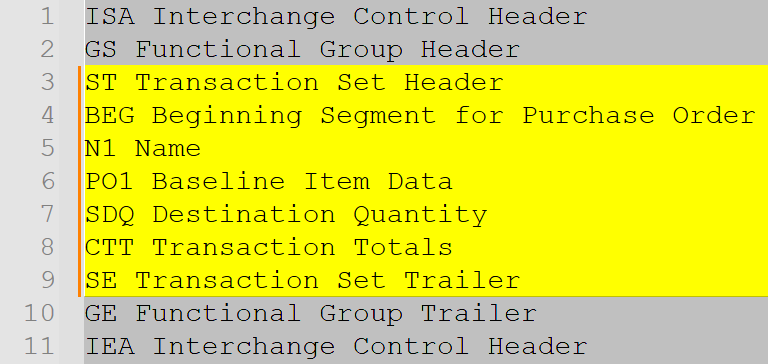
Key data elements include:
| Segment | Description |
|---|---|
| ST | Transaction Set Header |
| BEG | Beginning Segment for Purchase Order |
| REF | Reference Identification |
| PER | Administrative Communications Contact |
| FOB | FOB Instructions |
| SAC | Allowances/Charges |
| ITD | Terms of Sale |
| DTM | Date/Time Reference |
| N1-N4 | Party Identification |
| PO1 | Baseline Item Data |
| PID | Item Description |
What are the Essential Components of the EDI 850 Purchase Order?
- ST: Transaction Set Header
- BEG: Beginning Segment for Purchase Order
- REF: Reference Identification
- PER: Administrative Communications Contact
- FOB: FOB Instructions
- SAC: Allowances/Charges
- ITD: Terms of Sale
- DTM: Date/Time Reference
- N1-N4: Party Identification
- PO1: Baseline Item Data
- PID: Item Description
What Common Segments are included with the EDI 850 PO?
| Segment | Description |
|---|---|
| ST | Transaction Header |
| BEG | Order Header |
| REF | References |
| DTM | Dates |
| N1-N4 | Names/Addresses |
| PO1 | Line Items |
| CTT | Transaction Totals |
What Status Codes are included with the EDI 850 Purchase Order?
Examples include:
- BEG01 = 00 (Original), 01 (Cancellation)
- BEG02 codes: SA (Stand-alone), RL (Release), BK (Blanket)
- Acknowledgment Type (BEG07 = AC: Acknowledge with detail/change)
What Reason Codes are included with the EDI 850 PO? 
Examples include:
- SAC04 (Special Service/Promotion codes)
- REF qualifiers: CO (Customer Order), CR (Customer Reference), DP (Department)
- Cancellations, order updates, or pricing adjustments
What Use Cases are supported by the EDI 850?
- Standard, planned, and blanket orders
- Drop-ship and direct-to-consumer orders
- Cross-dock and distribution requirements
- Import/export transactions with INCO terms
What are the Benefits of the EDI 850 Purchase Order?
- Streamlined procurement lifecycle
- Reduced manual entry and errors
- Faster order confirmations and shipments
- Better audit and compliance tracking
How Efficient is the EDI 850 PO?
Speeds up processing and reduces cycle times
How Compliant is the EDI 850 Purchase Order?
The  EDI 850 Purchase Order aligns with X12 v4010 standards, meets GS1, VICS, UCS, and trading partner requirement for UPC and EPC guidance, common AS2 transport practices and protocols, The the EDI 850 Purchase Order supports buyers, sellers, warehouse networks and industry and is used in PartnerLinQ-connected ecosystems.
What is the format of the EDI 850?
Follows ASC X12 v4010 standards with PartnerLinQ delimiters.
How Accurate is the EDI 850 PO?
Ensures consistent order and shipment data across parties. Standardizes data exchange for consistent reporting.
What are the limitations of the EDI 850?
Requires trading partner alignment for changes and cancellations. PartnerLinQ suggests a ‘change by refresh’ process for clients who expect their outbound orders to change and anticipate the use of change or replacement orders. Customization may be observed in specific industries like retail, alcohol, or import/export.
Are Guidelines and Sample Files for the EDI 850 Purchase Order Available?
Yes. PartnerLinQ provides sample EDI 850 Purchase Order Transaction and implementation guides through its Support and Guideline Management Team.
Sample EDI 850 implementation guides illustrate both inbound and outbound flows, segment layouts, and valid data examples and support testing and partner onboarding. Customized specification documents for use in on boarding and technical development are available upon request.
PartnerLinQ provides:
- EDI 850 Purchase Order transaction implementation guide
- Sample payloads
- Qualification and testing maps
- Error handling and best-practice notes
What are the Basic Questions for Integration of the EDI 850 Purchase Order?
- Are
 there Samples and Specs available?
 - Are there other parties interested in this same transaction?
- What transactions might these interested parties also be a party to?
- What type of connection will be used for exchanging the EDI Files? example: AS2 or VAN connection?
- Are orders inbound or outbound?
- Does the party use a VAN today?
- Are they Inbound to the client or outbound from the client to another party?
- What types of Orders are in scope? example; Stand Alone, Dropship, or direct-to-consumer, blanket, or Bulk?
- Will there be one-time address added to the ERP from the EDI file?
- Do these one-time addresses need to go anywhere else, like a CRM system?
- Are PO Changes accommodated?
- How do you handle changes to orders today?
- Is there automation? (an internal systems triggers) or are PO changes triggered manually
- Is the customer only sending EDI or are there other ways to get the order into the system?
- How will cancellations and changes be managed?
Is there customization to accommodate Order to Cash flows in the ERP? - How will ERP handle one-time addresses or cross-references?
- Are SAC allowances/charges supported?
- How are Payment Terms, FOB, INCO Terms, and/or Method of Payment terms applied?
- How are Delivery Addresses handled?
- How are Orders created as a Journal entry or Sales Order, proceeding to pick release?
- How are items identified?
- Are Line Items identified by SKU or UPC?
- Are there pre-pack items?
- Is the EDI 832 Price/Sales Catalog transaction in use?
- How does pricing work?
- Are we expecting Service, Promotion, Allowance, or Charge Information (SAC) with the PO?
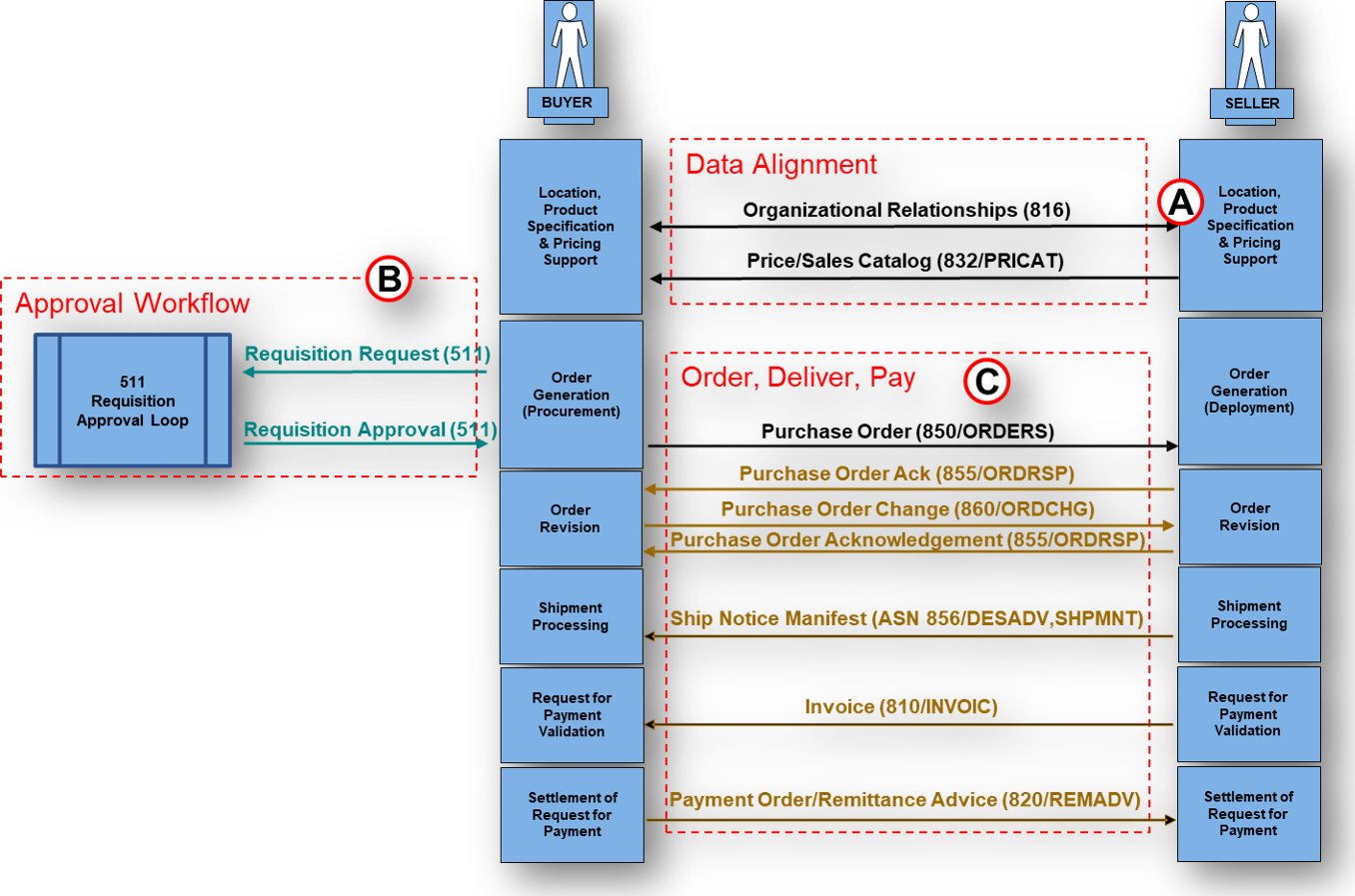
What is the Business Level Workflow for the EDI 850?
- Buyer creates PO in ERP
- PO translated to X12 EDI 850 format
- Secure transmission via AS2, VAN, or SFTP
- Seller receives and validates
- 997 acknowledges receipt
- 855 confirms acceptance or change
- 860 communicates order changes
- 856 ASN details shipment
- 810 Invoice completes process
What are the Best Practices for using the EDI 850?
- Use 'change by refresh' for PO updates
- Ensure REF qualifiers are applied consistently
- Include ITD terms for accurate invoice matching
- Validate SAC charges align with contracts
What Transactions are associated with the EDI 850?
| Transaction | Role |
|---|---|
| 855 | Purchase Order Acknowledgment |
| 860 | Purchase Order Change |
| 856 | Advance Ship Notice |
| 810 | Invoice |
| 997 | Functional Acknowledgment |
| 832 | Price/Sales Catalog |



Explore Our Integration Solutions

PartnerLinQ Integration Solutions
Connect Everything. Integrate Intelligently.
Future-Proof Your Business with Composable, AI Powered Connectivity.