
How do the EDI 850 and EDIFACT ORDERS compare?
Where the X12 EDI 850 also known as an electronic Purchase Order , used to initiate the order-to-cash cycle in the US and North America. The EDIFACT ORDERS message is the international EDI standard for electronic purchase orders, the international counterpart for transmitting purchase orders across global markets.
Both are used to replace paper-based purchase orders and ensure consistent, secure, and efficient communication between global trading partners, Frequently incorporated into trading programs between buyers and sellers, they are used to communicates buyer requests to sellers electronically, streamlining procurement, improving speed, reducing costs, and ensuring compliance between buyers, sellers and international agencies. Typical data includes items, prices, quantities, shipping details, and payment terms.
| Category | ANSI X12 | EDIFACT |
|---|---|---|
| Standard | ANSI X12 v4010 | UN/EDIFACT D96A |
| Message Name | 850 – Purchase Order | ORDERS – Purchase Order |
| Purpose | Initiate order-to-cash cycle | Transmit purchase orders globally |
| Workflow | 850 → 855/860 → 856 → 810 | ORDERS → ORDRSP/ORDCHG → DESADV → INVOIC |
How does PartnerLinQ use EDI 850 and EDIFACT ORDERS transactions?
PartnerLinQ ingests  both EDI 850 and EDIFACT ORDERS into ERP/OMS workflows, supports stand-alone and blanket orders, and normalizes references, dates, parties, and pricing into a consistent internal model for downstream transactions.
The PartnerLinQ platform integrates EDIFACT ORDERS and X12 850s interchangeably, streamlining procurement, optimizing order intake and enabling automatic acknowledgment & confirmation. Leveraging subsequent EDIFACT and X12-based transactions, PartnerLinQ seamlessly transforms data directly into enterprise-based ERP and OMS systems supporting complex scenarios that include cross-dock, drop-ship, direct-to-consumer, blanket orders, and PO releases across international markets.
What Responses to the EDI 850 and EDIFACT ORDERS are expected or sent?
The EDIFACT ORDERS and EDI 850 messages underpin collaboration between suppliers, retailers, manufacturers, and logistics providers by digitizing the entire purchase order process.
Typical responses to the EDI 850 include:
- 997 Functional Acknowledgment (receipt confirmation)
- 855 Purchase Order Acknowledgment (acceptance or changes)
- 860 Purchase Order Change Request
- 856 Advance Ship Notice
- 810 Invoice
Typical responses to EDIFACT ORDERS, include:
- ORDRSP (Order Response) to confirm acceptance or propose changes
- DESADV (Despatch Advice) for shipment details
- INVOIC (Invoice) to finalize billing
- CONTRL (Functional Acknowledgment) to confirm syntax validity
Responses to the EDI 850 vs EDIFACT ORDERS (Table)
| Purpose / Type of Response | X12 / EDI 850 Response(s) | EDIFACT / ORDERS Response(s) | Comments / Notes / Additional Messages |
|---|---|---|---|
| Functional / Syntax Acknowledgment | 997 Functional Acknowledgment (receipt confirmation) | CONTRL (or sometimes APERAK) | CONTRL is the EDIFACT functional (syntax) acknowledgment. APERAK is used for application-level acknowledgments or reporting. |
| Order Acknowledgment / Acceptance / Changes | 855 Purchase Order Acknowledgment (accept, reject, or accept, reject with changes) | ORDRSP (Order Response) | ORDRSP may confirm the order, accept with modifications, or reject; is the EDIFACT equivalent of 855. |
| Order Change Request | 860 Purchase Order Change Request | ORDCHG (Order Change) | The “860” in X12 corresponds to "ORDCHG" in EDIFACT. |
| Order Change Acknowledgment / Response | 865 Purchase Order Change Acknowledgment | ORDRSP (for change acknowledgment) | In X12 flows, an 865 acknowledges changes proposed in an 860; in EDIFACT the same ORDRSP message type is often reused to respond to ORDCHG. |
| Shipping Advice / Notification | 856 Advance Ship Notice | DESADV (Despatch Advice) | DESADV is the EDIFACT message for shipment / dispatch details (analogous to ASN / 856). |
| Receiving / Goods Receipt Advice | Available though not used in simple flows (861 Receiving Advice/Acceptance Certificate) | RECADV (Receiving Advice) | The buyer / receiver may send RECADV in EDIFACT to confirm what was physically received. |
| Invoice / Billing | 810 Invoice | INVOIC (Invoice) | This is the billing message in both standards. |
| Remittance / Payment Advice | 820 Remittance Advice | REMADV (Remittance Advice) | Though not strictly a “response” to the order, this message closes-out payment. |
| Catalog / Price Updates | 832 Price/Sales Catalog | PRICAT (Price Catalogue) | While not exactly a “response” message both X12 and EDIFACT catalog messages are used to synchronize product data. |
| Inventory Reports / Status | 852 Product Activity Data (inventory & sales) | INVRPT (Inventory Report) | EDIFACT has messages for reporting inventory, which can inform ordering decisions downstream. |
| Delivery Forecast / Scheduling | 830 Planning Schedule / Material Release | DELFOR or DELJIT | EDIFACT supports forecasting / release scheduling messages. |
What do the EDI 850 and EDIFACT ORDERS transactions support?
Both EDI 850 and EDIFACT ORDERS support streamlined procurement, compliance with trading partner requirements, and enhanced visibility across supply chains. PartnerLinQ EDI 850 and EDIFACT ORDERS specifications ensure secure transmission, industry compliance, and audit readiness.
Accepting an EDI 850 or EDIFACT ORDERS from your trading partner is typically insufficient for full EDI compliance. Most trading partners will expect other EDI transactions in response to or following the purchase order such as:
| Transaction Purpose | Transaction | Role |
|---|---|---|
| Functional Acknowledgements | 997 / CONTRL | FUNACK / APERAK – Confirms receipt |
| Order Responses | 855 / ORDRSP | Confirms order received, heading toward fulfillment |
| Advance Ship Notice | 856 / DESADV / SHPMNT | Describes the contents of each shipment, i.e. how items were packed in the containment |
| Invoices | 810 / INVOIC | Confirms shipment has been made |
What are the Key Features of EDI 850 and EDIFACT ORDERS messages?
While EDI 850 and EDIFACT ORDERS messages are different, and significantly so in terms of where they are used, the segments and elements included, they are virtually identical from a practical perspective, EDI 850 and EDIFACT ORDERS messages:
- Are electronic representation of purchase orders
- Reduce manual entry errors
- Support blanket and stand-alone orders
- Enable compliance with trading partner requirements
- Trigger downstream processes and response transaction documents like acknowledgments, shipment notices, and invoices
| Category | ANSI X12 | EDIFACT |
|---|---|---|
| Standard | ANSI X12 v4010 | UN/EDIFACT D96A |
| Message Name | 850 – Purchase Order | ORDERS – Purchase Order |
| Purpose | Transmit buyer order details | Transmit buyer order details |
| Core References | BEG03 PO #, REF qualifiers | BGM doc #, RFF references |
| Dates | DTM (order/delivery dates) | DTM (order/delivery dates) |
| Parties | N1/N2/N3/N4 loops | NAD segments |
| Pricing | PO1 + PID, SAC allowances/charges | LIN + PRI, MOA amounts |
| Workflow | 850 → 855/860 → 856 → 810 | ORDERS → ORDRSP/ORDCHG → DESADV → INVOIC |
What is the Purpose of EDI 850 and EDIFACT ORDERS messages?
The EDI 850 (X12) and EDIFACT  ORDERS messages serve the same fundamental business purpose: to formally communicate a buyer’s intent to purchase goods or services from a seller under agreed commercial terms. They are the foundational, initiation documents in B2B commerce and supply-chain execution.
EDI 850 (X12) and EDIFACT ORDERS messages are used by a buyer to formally request goods or services from a seller under commercial terms, they serve as the system-of-record order document, a formal electronic purchase order that initiates the order-to-cash (OTC) lifecycle and include:
- Product or service identification (items)
- Quantities and delivery schedules (item quantities)
- Pricing, allowances, and commercial terms (items pricing)
- Commercial and logistical conditions governing fulfillment
- Delivery, party, and reference information
What Information is Included in the EDI 850 and EDIFACT ORDERS messages?
Both standards include all information required for a seller to accept, fulfill, ship, and invoice an order. Focusing on what data the messages carry, segment syntax, and what is present in most production implementations across industries. EDI 850 (X12) and EDIFACT ORDERS messages include header details, buyer/seller, order and delivery dates, line items with quantities and pricing, and totals.
| Category | ANSI X12 | EDIFACT |
|---|---|---|
| Order Identification & Control (Header) | BEG – Beginning of PO | BGM – Beginning of Message |
| Trading Partner & Party Information (Parties) | N1 Buyer/Seller | NAD Buyer/Seller |
| Product & Line-Item Details (Items) | PO1 – Item Details | LIN / QTY / PRI – Item Details |
| Dates & Scheduling (Dates) | DTM – Order/Delivery Dates | DTM – Order/Delivery Dates |
| Pricing & Commercial Terms | ITD – Terms of Sale / Deferred Terms of Sale | PAT – Payment Terms Basis |
| Shipping, Logistics & Instructions | TD5 – Carrier Details | TDT – Details of Transport |
| References & Supporting Information | REF – Reference Identification | RFF – Reference |
| Totals & Summary Data (Totals) | CTT – Totals | UNT – Totals |
What are the Essential Components of EDI 850 and EDIFACT ORDERS messages?
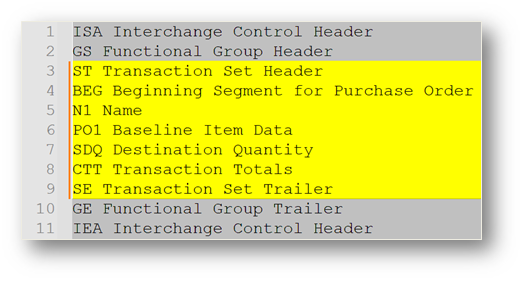
Both EDI 850 (X12) and EDIFACT ORDERS standards define essential structural elements for transmitting purchase orders. Below are key segments and qualifiers:
- X12 EDI 850: ST, BEG, REF, PER, FOB, SAC, ITD, DTM, N1–N4, PO1, PID, CTT, SE
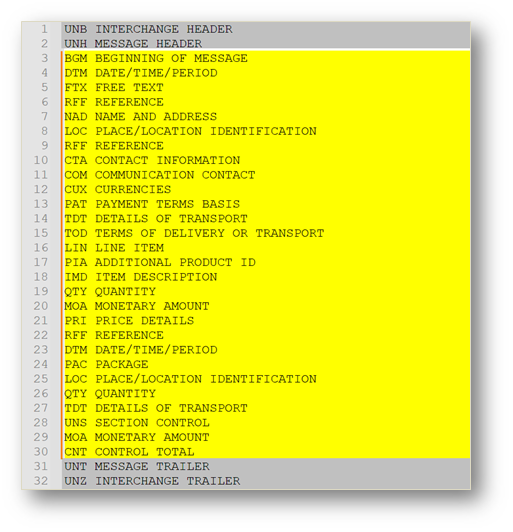
- EDIFACT ORDERS: UNH, BGM, DTM, NAD, RFF, CUX, LIN, QTY, PRI, UNS, UNT
| Segment | ANSI X12 – EDI 850 | EDIFACT – ORDERS |
|---|---|---|
| Header | ST – Transaction Set Header | UNH – Message Header |
| Start | BEG – Beginning Segment for PO (BEG01=00 Original, 01 Cancel; BEG02=SA Standalone, RL Release) | BGM – Beginning of Message (BGM1225=9 Original, 1 Cancel, 4 Change) |
| Dates | DTM – Date/Time Reference | DTM – Date/Time/Period |
| Parties | N1–N4 – Party Identification | NAD – Name and Address |
| Items | PO1 – Baseline Item Data (PID for descriptions) | LIN – Line Item (QTY for quantities, PRI for price) |
| Totals | CTT – Transaction Totals | UNS / UNT – Section and Trailer |
What Common Segments are included in the EDI 850 and EDIFACT ORDERS messages?
Focusing on segments that appear in most real-world implementations regardless of industry, both standards include functionally equivalent segments for all critical purchase-order data in support of core purchase-order business functions. Below is a list of commonly used segments across implementations of both standards:
- X12: ST, BEG, REF, DTM, N1–N4, PO1, CTT
- EDIFACT: UNH, BGM, DTM, NAD, LIN, QTY, PRI, UNT
| Category | ANSI X12 – EDI 850 | EDIFACT – ORDERS |
|---|---|---|
| Header | BEG – Beginning Segment | BGM – Beginning of Message |
| Dates | DTM – Order & Delivery Dates | DTM – Order & Delivery Dates |
| Parties | N1 – Buyer, Seller, Ship-To | NAD – Buyer, Seller, Delivery Party |
| Line Items | PO1 – Item Details | LIN – Item Details |
| Totals | CTT – Totals | UNT – Totals |
What Status Codes are included in the EDI 850 and EDIFACT ORDERS messages?
Status codes indicate the type and intent of the purchase order in both standards:
- X12: BEG01 (00=Original, 01=Cancellation), BEG02 (SA/RL/BK)
- EDIFACT: BGM1225 (9=Original, 1=Cancellation, 4=Change)
| Code | ANSI X12 – EDI 850 | EDIFACT – ORDERS |
|---|---|---|
| Order Type | BEG01: 00 = Original, 01 = Cancellation | BGM1225: 9 = Original, 1 = Cancellation |
| Order Function | BEG02: SA = Standalone, RL = Release, BK = Blanket | BGM1225: 4 = Change |
What Reason Codes are included in the EDI 850 and EDIFACT ORDERS messages?
Reason codes communicate additional context such as allowances, charges, or references:
- X12: SAC04 allowance/charge reason; REF qualifiers (e.g., CO, CR, DP)
- EDIFACT: RFF/FTX qualifiers for price adjustments, delivery constraints
| Qualifier | ANSI X12 – EDI 850 | EDIFACT – ORDERS |
|---|---|---|
| Allowance/Charge | SAC04: CO = Contract, CR = Credit, DP = Discount | FTX or RFF: Qualifiers such as AAI = General Info, PD = Delivery Problem |
| Reference | REF01: CO = Customer Order #, CR = Customer Reference # | RFF: ON = Order Number, CR = Customer Ref |
What Use Cases do the EDI 850 and EDIFACT ORDERS messages support?
Practical use cases that highlight how electronic orders (EDI X12 850 or EDIFACT ORDERS) are applied in real-world supply chains:
Retail Supply Chain Replenishment: Scenario: A large retailer (e.g., Walmart, Tesco, Carrefour) automatically generates purchase orders when inventory at distribution centers or stores falls below threshold levels.
Benefits include:
- Eliminates out-of-stock situations through just-in-time replenishment.
- Reduces manual buyer intervention for high-volume, repetitive SKUs.
- Enables compliance with retailer mandates.
Automotive Tier-1 Supplier Order Processing: Automotive OEMs (e.g., Ford, Toyota, Volkswagen) place regular, scheduled orders with Tier-1 suppliers for parts (e.g., brake systems, wiring harnesses, tires, lights).
Benefits include:
- Aligns suppliers with OEM production schedules (lean manufacturing).
- Reduces inventory holding costs at both OEM and supplier ends.
- Supports global operations — X12 in North America, EDIFACT in Europe/Asia.
Healthcare & Pharmaceutical Ordering: Hospitals, pharmacies, and their supply chain networks (e.g., AmerisourceBergen, Cardinal, McKesson, Smith) order medications and medical supplies from manufacturers and distributors.
Benefits include:
- Ensures uninterrupted supply of critical medicines and devices.
- Improves regulatory compliance (tracking lot numbers, recalls, expiration dates).
- Enables automation for high-volume prescription and supply ordering.
What are the Overall Benefits of the EDI 850 and EDIFACT ORDERS messages?
Efficiency & Speed
- Faster processing: Orders move instantly between buyer and seller systems, eliminating delays from manual entry, fax, or mail.
- Automation: Orders integrate directly into ERP, WMS, or order management systems with minimal human intervention.
- Real-time acknowledgments: Functional acknowledgments (997/CONTRL) and order responses (855/ORDRSP) provide immediate confirmation, reducing waiting time.
Accuracy & Data Quality
- Fewer errors: Eliminates mistakes caused by manual re-keying (typos, pricing errors, mismatched part numbers).
- Validation: Built-in business rules and segment validations ensure clean, standardized data.
- Consistency across partners: All trading partners use agreed-upon codes, formats, and standards, reducing ambiguity.
Cost Reduction
- Lower operational costs: Reduces printing, mailing, faxing, and manual labor expenses.
- Inventory savings: Faster and more accurate ordering enables better demand forecasting and lower safety stock.
- Reduced dispute resolution costs: Clear, accurate digital records minimize disputes over pricing, quantities, or shipping.
Visibility & Control
- End-to-end order tracking: When combined with responses (ORDRSP/855, DESADV/856, INVOIC/810), companies gain full visibility from order placement to delivery and billing.
- Exception management: Automated alerts for errors, missing documents, or rejected transactions allow proactive intervention.
- Audit trail: Digital documentation creates a compliant, searchable history of orders.
Compliance & Partner Requirements
- Mandatory in many industries: Large retailers (e.g., Walmart, Amazon), automotive OEMs, and healthcare distributors require suppliers to use EDI/EDIFACT.
- Regulatory alignment: Supports compliance with industry mandates like HIPAA (healthcare), GS1 (retail), and automotive standards (ODETTE, VDA).
How Efficient are EDI 850 and EDIFACT ORDERS messages?
EDI 850 and EDIFACT ORDERS messages speed up order entry, order tracking and decision-making for both buyers and shippers. While in a manual process the buyer has to print, fax, perhaps call and confirm the order, EDI by contrast has one task and, in most cases, a very simple task that completes the integration with suppliers at the touch of a button (Send).
The contrast between manual data entry and EDI becomes more evident in the latter steps where the seller has to review the order, make arrangements for order processing and data entry, and confirm the order with the buyer before processing to pick, pack and ship.
X12 and EDIFACT ORDERS have a distinct advantage over manual orders, PO’s entering the seller’s system are automatically received, acknowledged and confirmed back to the buyers system, completing the automation between both buyer and seller system which means if no errors are detected on the outgoing PO from the buyer, the order is placed taking the first step toward shipment, almost instantaneously.
| Manual PO Entry Process | EDI PO Transaction |
|---|---|
| The Buyer creates a purchase order and sends to supplier either through email, fax or phone call | Buyers ERP system triggers the order which generates an EDI Purchase Order to the appropriate supplier |
| The Supplier receives purchase order, sorts as needed, and delivers to appropriate order entry rep. | EDI PO is sent from Buyers ERP system through the EDI network instantly to the Suppliers EDI Mailbox |
| The Order entry rep reviews purchase order informing the buyer by email or phone call that the order is being processed | The Supplier receives EDI PO via their AS2 connection and responds instantly with a Message Delivery Notification (MDN) confirming receipt of the document & passes the PO to the EDI system which sends a Functional Acknowledgement (997) to the Buyers ERP system, the order is in process. |
| The Order entry rep verifies the customer account, validates the pricing, UPC codes, descriptions, quantities, ship to/bill to locations and product availability with the warehouse by email or phone call | The suppliers EDI system parses the EDI PO data into the ERP, applies business rules validating product availability, pricing, ship date, & locations and sends a Purchase Order Acknowledgement (855) to the buyers ERP |
| Order entry rep key in the customer purchase order information into their Order entry and management system, verifies product availability, confirms ship date, and advises customer of backorders & price changes | The Suppliers ERP system is updated with PO and creates Warehouse Shipping Orders (940) instructing the warehouse to pick order, responding to the ERP with Warehouse Shipping Advice (945) when ready to ship. |
| Fulfilment quantities are updated by Order Entry rep and shipment confirmation is conveyed either by phone, fax or email to the customer. | Suppliers ERP system generates an Advance Ship Notice (856) which is sent back to buyer confirming shipment, ship date, order, packing, items, & traceability elements to the customer. |
| Total time to process a manual Purchase Order - 3 to 4 hours | Total time to process an X12/EDIFACT Purchase Order - 3 to 4 minutes |
How Compliant are EDI 850 and EDIFACT ORDERS messages?
EDI 850 and EDIFACT ORDERS are not only designed to meet requirements for demand side partners, they were in fact partners to their creation and maintenance of them. Consortium-driven, both X12 and UN/EDIFACT standards were intentionally designed as open, consensus-based standards, governed by consortiums that represent equally:
- Buyers and sellers
- Industry associations
- Technology vendors
- Logistics providers
- Government and regulatory bodies
Open, consensus-based standards, particularly when engaging sell side companies, benefit suppliers and buyers. Consortium governance intentionally prioritizes stability over speed, interoperability over advantage, backward compatibility over rapid development. This is why EDI standards rarely break, remain relevant for decades, and co-exist with a growing bench of newer technologies (including AI) rather than being replaced outright. In other words, EDI standards are not as much ‘designed’ as much as they are ‘negotiated’ and agreed to through processes that include the following which prevent fragmentation while allowing for evolution over time.
- Industry Participation & Membership
- Business Requirement Identification
- Working Group Design & Modeling
- Drafting, Review, and Balloting
- Publication & Versioning
- Ongoing Maintenance & Governance
What is the Format of EDI 850 and EDIFACT ORDERS messages?
EDI 850 and EDIFACT ORDERS meet requirements for partners in terms of formatting and structure and can be incorporated into the supply chain faster than those partners who do not subscribe to using standardized transactions. The EDI 850 follows ASC X12 standards, with v4010, a version of the standard developed in 1998 that remains the most commonly used standard even today. The EDIFACT ORDERS message follows UN/EDIFACT messaging standard like D96A, a commonly used version of the EDIFACT standard developed in 1995. ‘D’ a notation that identifies a Draft , ‘96’ denoting the year released, and ‘A’ indicating the guideline was released in the first half of the year, in this case 1996, D96A.
How Accurate are EDI 850 and EDIFACT ORDERS messages?
EDI 850  and EDIFACT ORDERS messages standardize data exchanges ensures consistent order and shipment data across parties. These messages standardize the exchange of data between parties which improves accuracy through structure improves visibility and consistency across ERP and OMS systems supporting complex scenarios that include cross-dock, drop-ship, direct-to-consumer, blanket orders, and PO releases across international markets and consistent reporting.
The PartnerLinQ platform recognizes visibility is a foundational capability that transforms how modern supply chains operate — a foundational capability that connects systems and makes data actionable. Consistent reporting in this respect is tightly coupled with visibility — by aggregating and normalizing data from disparate sources, PartnerLinQ places an emphasis on business transactions understanding that they can influence systems and operations, so users get reliable data, analytics, and performance through the transportation, transformation and integration of transaction documents from version & subset management to canonical modelling, testing and onboarding, error-handling and feedback loops, and an ever increasing bench of newer technologies that include AI.
What are the Limitations of EDI 850 and EDIFACT ORDERS messages?
EDI 850 or EDIFACT ORDERS are only as good as the sender, in other words, recipients should expect and prepare for quality differences regardless of standard due to differences in (A) supply chain software and (B) individual skill.
PartnerLinQ’s modern platform helps standardize and automate business rules so data conforms automatically during translation and transformation workflows.
Are Guidelines & Sample Files for the EDI 944 Warehouse Stock Transfer Receipt Advice available?
Yes. Sample EDI 850 or EDIFACT ORDERS implementation guides that support testing and partner onboarding are available through PartnerLinQ.
Sample EDI 850 or EDIFACT ORDERS implementation guides illustrate both inbound and outbound flows, segment layouts, and valid data examples and support testing and partner onboarding. Customized specification documents for use in on boarding and technical development are available upon request.
PartnerLinQ provides:
- EDI 850 or EDIFACT ORDERS implementation guide
- Sample payloads
- Qualification and testing maps
- Error handling and best-practice notes
What are the Basic Questions for Integration of EDI 850 and EDIFACT ORDERS messages?
- Is EDI 850 or EDIFACT ORDERS transaction inbound or outbound?
- How will cancellations and changes be handled?
- Are blanket orders or scheduled releases supported?
- How will integration with ERP handle one-time addresses or global terms?
- Are there Samples and Specs available?
- Are there other parties interested in this same transaction?
- What transactions might these interested parties also be a party to?
- What type of connection will be used for exchanging the EDI Files? example: AS2 or VAN connection?
- Does the sending party use a VAN today?
- Are they Inbound to the client or outbound from the client to another party?
- What types of Orders are in scope? example; Stand Alone, Dropship, or direct-to-consumer, blanket, or Bulk?
- Will there be one-time address added to the ERP from the EDI file?
- Do these one-time addresses need to go anywhere else, like a CRM system?
- Are PO Changes accommodated?
- How do you handle changes to orders today?
- Is there automation? (an internal systems triggers) or are PO changes triggered manually
- Is the customer only sending EDI or are there other ways to get the order into the system?
- How will cancellations and changes be managed?
- Is there customization to accommodate Order to Cash flows in the ERP?
- How will ERP handle one-time addresses or cross-references?
- Are SAC allowances/charges supported?
- How are Payment Terms, FOB, INCO Terms, and/or Method of Payment terms applied?
- How are Delivery Addresses handled?
- How are Orders created as a Journal entry or Sales Order, proceeding to pick release?
What is the Business Level Workflow of EDI 850 and EDIFACT ORDERS?
- Buyer generates purchase order in ERP.

- Translated to EDI 850 or EDIFACT ORDERS.
- Sent to supplier via AS2/SFTP/VAN.
- Supplier acknowledges receipt/responds.
- Supplier responds with 855 (X12) or ORDRSP (EDIFACT).
- Changes handled via 860/ORDCHG
- Order flows through fulfillment, Shipments via 856/DESADV
- Invoices follow 810/INVOIC.
What are the Best Practices for EDI 850 and EDIFACT ORDERS?
- Use global location and product codes (GLN, GTIN)
- Ensure payment and INCO terms are included
- Automate and normalize mapping between EDI 850 and EDIFACT ORDERS
- Validate references (REF/RFF) for alignment across partners
What Transactions are associated with the EDI 850 and EDIFACT ORDERS transactions?
- 855 Purchase Order Acknowledgment/ORDRSP (Order Response)
- 860 Purchase Order Change *Also ORDRSP (Purchase Order Response)
- 856 Advance Ship Notice/DESADV (Despatch Advice)
- 810 Invoice/INVOIC (Invoice)
- 997 Functional Acknowledgment/CONTRL (Acknowledgment)
- 832 Price/Sales Catalog



Explore Our Integration Solutions

PartnerLinQ Integration Solutions
Connect Everything. Integrate Intelligently.
Future-Proof Your Business with Composable, AI Powered Connectivity.