
What is EDI 816 Organizational Relationships Transaction?
The EDI 816 Organizational Relationships transaction is a standardized ANSI X12 message used to identify, define, and maintain relationships between entities within an organization or business network. The 816 helps trading partner companies communicate accurate and structured information about corporate hierarchies, subsidiaries, divisions, and locations across their enterprise and with their trading partners. The EDI 816 Organizational Relationships transaction serves as the foundation for linking entities such as “parent companies,” “branches,” “distribution centers,” “stores,” and “vendors” together as foundation data, and more specifically hierarchical location data.
How does PartnerLinQ use the EDI 816?
PartnerLinQ uses the 816  Organizational Relationships message to convey and update address and hierarchical location data for its vendors, carriers, and trading partners.
The EDI 816 supports the communication of store numbers, physical addresses, contact details, and organizational structures across subsidiaries, divisions, and operating units.
The 816 Organizational Relationships transaction is essential for maintaining accurate location information through automated updates and for establishing hierarchical relationships between entities such as a buying location and its associated bill-to, ship-to, or mark-for sites.
PartnerLinQ leverages the EDI 816 message as part of its Unified Digital Connectivity framework to ensure that organizational data is synchronized across ERP, WMS, TMS, and PartnerLinQ’s Decision Intelligence dashboards. This alignment reduces data redundancy and supports compliance through a single source of truth for enterprise location records.
What responses to the EDI 816 are expected or sent?
While the EDI 816 Organizational Relationships transaction are typically one-directional (from a parent organization to a partner), acknowledgment responses such as 997 Functional Acknowledgment or 999 Implementation Acknowledgment are used to confirm receipt and structural integrity of the transaction ensuring that both parties are one the same page. In cases where updates trigger downstream processing, the receiving partner may send an application-level response (e.g., an 824 Application Advice) to confirm successful integration or to report validation issues.
What does the EDI 816 Organizational Relationships message transaction support?
The  EDI 816 supports three core functions within enterprise data management:
- Identification of Organizational Hierarchies – The EDI 816 Organizational Relationships message helps companies to define relationships between parent companies, subsidiaries, divisions, departments, and stores in such a way that these relationships can be shared among trade partners.
- Maintenance of Business-Partner Information – The EDI 816 Organizational Relationships message helps trading partners streamline address and contact record management for vendors, customers, and third-party service providers.
- Automation of Location Updates – The EDI 816 Organizational Relationships message serves in providing advance notification of new or changing locations which reduces supply chain friction resulting from manual data entry and its use improves timeliness of data and shipments.
What are the Key Features of the EDI 816 Organizational Relationships message?
- Action-Oriented Processing: The EDI 816 message includes Add, Delete, and Change by Refresh options to manage records dynamically.
- Data Synchronization: : The EDI 816 Organizational Relationships message links the internal systems (ERP, TMS) to partner systems via AS2 or API connections ensuring real-time address management.
- Global Identification: The EDI 816 Organizational Relationships message supports D-U-N-S, GLN (Global Location Number) and other identification codes like LEI ( Legal Entity Identifier) and Tax IDs used in international recognition.
- Hierarchical Structure Support: The BHT and HL segments define parent-child relationships within the trading partner organization.
- Multi-Entity Representation: The EDI 816 Organizational Relationships message captures and organizes for transmission (sharing) information related to corporate headquarters, distribution centers, stores, and franchise locations in such a way that these relationships can be shared.
- Validation and Audit Readiness: The EDI 816 Organizational Relationships message promotes consistency and traceability across regulated industries (e.g., retail, healthcare, insurance).
What is the Purpose of the EDI 816 Organizational Relationships message?
The purpose of the 816 Organizational Relationships message is to minimize redundant address and hierarchy information transmitted and stored across Multi-Enterprise Supply Chain networks in multiple business transactions. Consolidating organizational data into a single transmission means that partners can update ERP and master-data repositories without manual effort or human intervention, relying instead on unique identification techniques to establish clear relationships between entities so that purchase orders, shipments, and invoices reference consistent location identities using unique identifiers (keys).
What Information is Included in the EDI 816 Organizational Relationships transaction?
Typical data elements included in the EDI 816 Organizational Relationships message:
- Entity Identification: Company or division name.
- Unique Identifiers: EIN, Tax ID, D-U-N-S, or GLN codes.
- Geographic Details: Address, city, state, postal code, country code.
- Contact Information: Names, phone numbers, emails (PER segment).
- Relationship Details: Type of relationship (parent/subsidiary, division, store), effective and expiration dates.
- Reference Numbers: Account IDs or routing numbers used for banking and partner files.
What are the Essential Components of the EDI 816 Organizational Relationships transaction message?
Essential Components the EDI 816 Organizational Relationships transaction includes are:
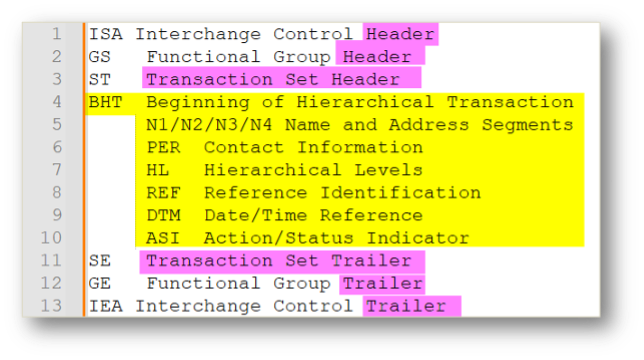
| Segment | Segment Name | Purpose / Usage |
|---|---|---|
| ST | Transaction Set Header | Begins the transaction and assigns a unique control number. |
| BHT | Beginning of Hierarchical Transaction | Defines the action code and purpose of the transaction message (Add, Delete, Change by Refresh). |
| N1/N2 | Name and Additional Name Information | Identifies the company or companies, divisions, locations, or hierarchical entities within the organization. |
| PER | Administrative Communications Contact | Can be used to specify the primary and other business contacts and their communication details. |
| HL | Hierarchical Level | Precisely defines parent-child relationships across multiple entities. |
| N3/N4 | Address and Geographic Information | Provides addressing and geographic information such as a physical address, city, state, postal code, country codes, even longitudinal and latitudinal coordinates within a structured message. |
| REF | Reference Information | Carries external identifiers (keys) and account reference information. |
| DTM | Date/Time Reference | Specifies creation and effective dates of updates. |
| ASI | Action or Status Indicator | Communicates status or processing flags within the hierarchy. |
| SE | Transaction Set Trailer | Concludes the transaction and validates record count for validation purposes. |
What are the Common Segments Included in the EDI 816 transaction?
ST – Transaction Set Header - Begins each transaction set and contains a unique control number. Ensures that every EDI 816 transmission is tracked and auditable from origin to receipt.
BHT – Beginning of Hierarchical Transaction - Defines the hierarchical structure and processing intent and can use a “Change by Refresh” option to indicate that data has been fully updated and should replace previous records in the recipient’s system.
N1 / N2 – Name and Additional Name Information - Identifies the organization, division, store, or warehouse. Supports D-U-N-S, GLN, and Tax ID qualifiers for location standardization. Enables accurate identification across complex supply-chain networks.
PER – Administrative Communications Contact - Specifies buyer or information contacts associated with the organization.
HL – Hierarchical Level - Establishes multi-tier relationships among entities (parent, subsidiary, store, etc.). Enables dependency mapping for nested organization data.
N3 / N4 – Address and Geographic Information - Captures Street, city, state, postal, and country codes, supports ISO 3166-1 alpha-2 country codes.
REF – Reference Information - Conveys cross-reference data (e.g., account numbers, location IDs, routing codes).
DTM – Date/Time Reference - Specifies creation, effective, and processing dates for updates, supports UTC/local time conversion for synchronization.
ASI – Action or Status Indicator - Provides status details regarding record activity (Add, Change, Deactivate). Ensures proper processing logic in integration pipelines.
SE – Transaction Set Trailer - Ends the transaction and validates segment count integrity.
Summary Table of Key Segments of the EDI 816 Organizational Relationships transaction:
| Segment | Description | Usage by PartnerLinQ |
|---|---|---|
| ST | Transaction header marking start of set | Defines the control number sequence for the transaction. |
| BHT | Beginning of hierarchy | Indicates Add, Delete, or Change by Refresh action codes. |
| HL | Hierarchical Level Loop | Defines parent-child relationships between entities. |
| N1/N2/N3/N4 | Name and Address segments | Specify identifiers and geographic locations. |
| PER | Administrative Contact | Identifies primary contacts and communication channels. |
| REF | Reference Information | Carries cross-reference identifiers and account codes. |
| DTM | Date/Time Reference | Records effective and processing dates. |
| ASI | Action/Status Indicator | Provides transaction state updates. |
| SE | Transaction Trailer | Closes and validates the transaction. |
What Status Codes are Used with the EDI 816 Organizational Relationships message?
PartnerLinQ supports standard X12 action/status codes within the BHT and ASI segments to represent the current state of a relationship record.
| Code | Meaning | PartnerLinQ Usage Notes |
|---|---|---|
| BHT02 = 00 | Original | Indicates the first submission of organizational data. |
| BHT02 = 02 | Add | Introduces new records such as new store or branch locations. |
| BHT02 = 03 | Delete | Removes existing records from the active hierarchy. |
| BHT02 = 04 | Change by Refresh | Change by Refresh - updates selected data elements (e.g., address change). |
| BHT02 = 08 | Status | Used to report a record’s operational state (e.g., Active, or Inactive). |
| ASI01 = 2 | Change by Refresh | Change by Refresh - a full refresh of all related information for an entity. |
What Reason Codes are Used with the EDI 816?
While the EDI 816 does not use reason codes as exclusively or extensively as documents like the EDI 860 or EDI 824 do, PartnerLinQ does support the use of controlled lists for organizational code lists and status management updates as might exist within some trade relationships, for example, If the REF01= TD indicating a ‘Reason for Change’, the REF02 might contain a code from a local code list, like a code from the sample reason code list in the example below.
| Reason Code | Description |
|---|---|
| ADD | Addition of a new location or entity relationship. |
| CHG | Change to existing information (e.g., address, contact update). |
| DEL | Deletion of a location or subsidiary record that is no longer in use. |
| MIG | Migration to new organizational structure or system. |
| COR | Correction of a previously transmitted record. |
What Use Cases Does the EDI 816 Support?
The EDI 816  Organizational Relationships message is used across multiple industries to support diverse operational and governance needs:
- Retail and Franchise Networks – The EDI 816 Organizational Relationships message is used to synchronize corporate, franchise, and store-level addresses for accurate ship-to and bill-to records.
- Manufacturing and Distribution – The EDI 816 Organizational Relationships message is used to map supplier and distributor hierarchies and link plant or warehouse codes to corporate parents.
- Healthcare and Insurance – The EDI 816 Organizational Relationships message is used to define relationships between providers, hospitals, and insurers and maintain eligibility under enterprise agreements.
- Public Sector and Regulatory Agencies – The EDI 816 Organizational Relationships message is used by Workers’ Compensation Boards and other agencies to track employer structures for policy and claims management.
- 3PL and Carrier Integration – The EDI 816 Organizational Relationships message is used to establish hierarchies for distribution centers, cross-dock locations, and value-added services providers.
What Are the Benefits of the EDI 816?
- Reduces Data Redundancies: – The 816 serves to minimize/eliminate the need to repeat address data on every transaction as might appear on purchase orders and other electronic business messages.
- Enhanced Automation and Data Accuracy: - The EDI 816 Organizational Relationships message is used to automate vendor or customer information file maintenance while promoting a consistent use of code values, location codes for precise location identification, and standard identifiers across systems eliminating duplicative efforts and reducing processing times.
- Enables Multi-System Alignment: - The EDI 816 Organizational Relationships message serves to minimize/eliminate Manual Processing, sending updates, changes or additions to ERP, WMS, TMS, and CRM systems to a single authoritative source of truth ensuring updates reach partners and systems on a timely basis.
- Advance Change Notification - The EDI 816 serves to provide advance notification to the supplier of changes or additions to location information, while it accelerates on-boarding by automating partner file setup and reducing manual record creation.
- Supports Regulatory Compliance: - The EDI 816 Organizational Relationships message ensures traceable hierarchical relationships for auditing and policy administration while Improving Operational Visibility through data feeds and alignment with real-time organizational context.
How Efficient Is the EDI 816?
The EDI 816 Organizational Relationships message is efficient, and it promotes efficiencies. Connecting the EDI 816 to Smart Visibility and Digital Connectivity frameworks, the 816 provides a near-real-time synchronization layer between internal and external systems Its built in “Change by Refresh” method reduces manual data touchpoints and improves processing efficiency by automating record replacement rather than wading through partial updates through manual means, an approach that supports mass updates of large hierarchies with minimal latency.
How Compliant Is the EDI 816?
PartnerLinQ complies with ANSI X12 version 4010 standards and supports interchange via AS2, VAN, and REST API transport methods. Compliance is maintained through strict adherence to control segments, industry-standard qualifiers (GLN, D-U-N-S, etc.), secure message validation protocols including 997, 999, and MDN acknowledgments and global frameworks like ISO 3166-1 country codes and GS1 data structures for multi-region data exchange.
What is the Format of the EDI 816?
The EDI 816 Organizational Relationships Transaction uses the ANSI X12 to identify, define, and maintain relationships between entities within an organization or business network. It enables companies, serving as the foundation, to communicate accurate and structured information about corporate hierarchies, subsidiaries, divisions, and locations across their enterprise and with trading partners.
Each segment uses delimiters: (suggested production delimiters)
| Type | Character | Hex Code |
|---|---|---|
| Segment Separator | ~ | 7E |
| Element Separator | * | 2A |
| Sub-element Separator | > | 3E |
How Accurate Is the EDI 816?
Accuracy depends  on synchronized master data, identifiers, location codes, and partner code lists and is achieved through the availability use of unique location identifiers at the enterprise level and automated validation rules embedded in PartnerLinQ’s integration layer. Validation of ST/SE control numbers and mandatory content supports processing integrity and each 816 is cross-checked against existing records to detect duplicates, invalid postal codes, or non-standard ISO country entries. PartnerLinQ also performs loop validation on HL hierarchies to ensure logical parent-child consistency before the update is committed.
- Synchronized location master data.
- Validation Automation
- Discrepancy handling processes
What Are the Limitations of the EDI 816?
Limitations of the EDI 816 Organizational Relationships message are few when used as designed or intended.
- The EDI 816 Organizational Relationships message does not carry financial or transactional data (e.g., no pricing, no quantities) which makes it pretty secure in its own right.
- The EDI 816 Organizational Relationships message relies on partner synchronization for hierarchical accuracy where delays in acknowledgment, automation, and incorporation can affect timeliness.
- The EDI 816 requires version management (control mechanisms) when multiple systems update organizational data simultaneously.
- Limited error feedback beyond functional acknowledgments (997/999).
Despite these constraints, the 816 remains the industry standard for organizational data exchange.
Are Guidelines and Sample Files available for the EDI 816 Available?
Yes. PartnerLinQ provides sample EDI 816 Organizational Relationships Transaction and implementation guides through its Support and Guideline Management Team.
Sample 816 implementation guides illustrate both inbound and outbound flows, segment layouts, and valid data examples and support testing and partner onboarding. Customized specification documents are available upon request via Support@PartnerLinQ.com for use in on boarding and technical development.
PartnerLinQ provides:
- EDI 816 Organizational Relationships implementation guide
- Sample payloads
- Qualification and testing maps
- Error handling and best-practice notes
What Are the Basic Questions for EDI Integration with the EDI 816?
When planning an EDI 816 integration, PartnerLinQ recommends evaluating the following:
- Are samples and specifications available from both sides?
- What is the general direction of the transaction?
- Are they Inbound or outbound to another party?
- What acknowledgments or responses are expected (997, 999, 824)?
- Are there samples and specs of the response transaction available?
- Are there other interested parties?
- Who are the parties to receive the data provided by the EDI 816 (Vendors, Carriers, ERP or Master Data Team)?
- What transactions might these interested parties be a party to?
- How are changes to location information that result in changes to the Organizational Relationships (816) business message transaction triggered/managed today — automatically or manually?
- Is there automation? (an internal systems trigger) or are Organizational Relationships (816) business message transactions triggered manually?
- Are responses and changes automatically triggered? (an internal systems trigger) or do transactions require human intervention?
- Are there internal system events that initiate “Change by Refresh” transactions?
- What information are you trying to convey to your partner in establishing an electronic relationship?
- Which data elements define organizational relationships (Parent ↔ Child, Bill-to ↔ Ship-to)?
- Which data elements define an organization (Location, role, (e.g., Bill-to, Ship-to Store Number), Address, Account number, ABA Transit/Routing Numbers, Contact Information)?
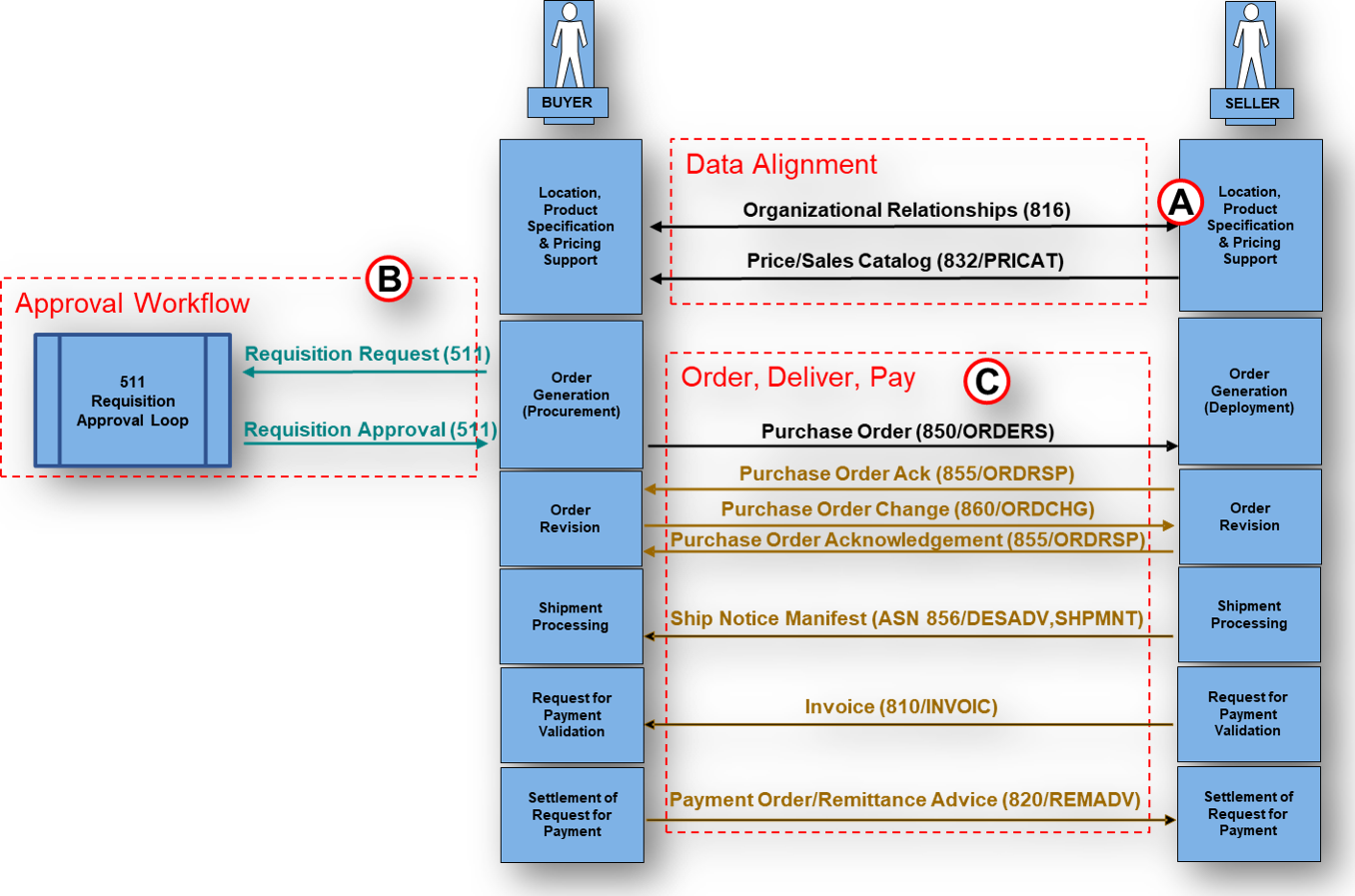
What Business-Level Workflow Does the EDI 816 Support?
- Hierarchy is Created or Updated: Middleware/Integration
 platform (PartnerLinQ) or ERP detects a new or changed organizational record in the Master data, creating an event or file indicating the beginning of file processing.
 - EDI 816 Generated: Master data is converted into the EDI 816 data structure and is transmitted (sent) via AS2/VAN/API by the Middleware/Integration platform (PartnerLinQ).
- Acknowledgment Receipt and Validation: EDI 816 data is received and acknowledged by the Middleware/Integration platform (PartnerLinQ), the recipient returning an MDN, Functional Acknowledgement (FA, 997) to confirm receipt and a 999 (Implementation Acknowledgement validating the data structure.
- Downstream System Receipt and Updates: The recipients systems parse the EDI 816 file, creates and or and updates hierarchy records, ERP, TMS, and WMS modules are refreshed automatically.
- Audit and Compliance: Middleware/Integration platform (PartnerLinQ) logs the transaction in its Decision Intelligence repository for traceability.
This workflow ensures that every partner operates with a consistent and verified hierarchical model.
What Are the Best Practices for Using the EDI 816?
| Category | Best Practice | PartnerLinQ Guidance |
|---|---|---|
| Data Governance | Maintain a single source of truth for location data. | Ensure ERP and PartnerLinQ records use identical GLN/D-U-N-S identifiers. |
| Change Management | Use “Change by Refresh” to replace entire records. | Prevents partial updates and guarantees data completeness. |
| Validation | Enable loop validation and acknowledgment tracking. | Confirms that all child locations tie to a parent. |
| Security | Transmit only over encrypted protocols (AS2/HTTPS). | Protects PII and organizational sensitive data. |
| Testing | Perform parallel testing with partners before go-live. | Ensures segment-level alignment and compliance. |
| Documentation | Retain PartnerLinQ implementation guides. | Facilitates future audit and certification reviews. |
What Transactions Are Associated with the EDI 816?
| Related Transaction Set | Name / Purpose | Relationship to 816 |
|---|---|---|
| 850 | Purchase Order | References N1 location codes defined in the 816. |
| 855 | Purchase Order Acknowledgment | Confirms order receipt for N1 entities defined in 816. |
| 856 | Advance Ship Notice | Uses ship-to and bill-to identifiers established by 816. |
| 860 | Purchase Order Change Request | Propagates location changes consistent with 816 hierarchy. |
| 810 | Invoice | Ensures billing addresses match the organization structure in 816. |
| 997 / 999 | Functional Acknowledgment | Acknowledges receipt of the 816 and confirms syntax validity. |
| 824 | Application Advice | Reports application-level errors in the 816 processing. |
Footnotes
- PartnerLinQ 816 Organizational Relationships content based on internal PartnerLinQ v4010 specification (2025-03-20).
- Delimiters and usage from PartnerLinQ EDI transmission standards.
- Segment-level interpretation from PartnerLinQ technical documentation ST, BHT, HL, N1/N2/N3/N4, PER, REF, DTM, ASI, SE.
- Workers’ Compensation Board reference adapted from generic public-sector use case formerly noted as Ohio BWC.
- All PartnerLinQ references © 2025 Visionet Systems, Inc. All rights reserved.



Explore Our Integration Solutions

PartnerLinQ Integration Solutions
Connect Everything. Integrate Intelligently.
Future-Proof Your Business with Composable, AI Powered Connectivity.