
What are Odette Message Types?
Odette message types are standardized automotive EDI messages developed by Odette International to support electronic communication between OEMs, suppliers, logistics providers, and manufacturing partners across Europe. Odette standards commonly align with EDIFACT, X12, SAP IDoc, and VDA transactions for purchasing, scheduling, shipping, invoicing, and payment automation.
Odette messages define electronic communication across manufacturing, logistics, and financial operations. Common Odette messages include ORDERS (Purchase Order), ORDRSP (Order Response), DELINS (Delivery Instruction), DELJIT (Delivery Just-in-Time), INVOIC (Invoice), RECADV (Receiving Advice), and SLSRPT (Sales Report). These messages are compatible with EDIFACT and ANSI X12 standards, supporting seamless European and global automotive integration.
How Odette Supports Multi-Standard Automotive Execution Orchestration?
Modern automotive supply chains require more than message translation — they require multi-standard execution orchestration across OEMs, suppliers, logistics providers, and ERP ecosystems. Odette standards help synchronize procurement, scheduling, shipment execution, invoicing, and payment workflows across EDIFACT, X12, SAP IDoc, and VDA environments to support manufacturing continuity and operational precision.
What is OFTP/OFTP2 in Odette EDI?
OFTP and OFTP2 are secure communication protocols widely used within automotive EDI environments to exchange Odette messages between OEMs and suppliers. OFTP2 supports encryption, compression, digital certificates, and secure file transfer across global automotive supply chains.
How Does PartnerLinQ Use Odette messages?
PartnerLinQ enables trading partners to manage Odette EDI right alongside their ANSI X12, EDIFACT, VDA, and SAP IDoc transactions. Through PartnerLinQ’s unified framework, European OEMs and Tier 1, 2, and 3 suppliers can exchange orders, shipments, and payment data promptly and efficiently, ensuring compliance with Tier 1 requirements, Odette standards and interoperability with global partners.
What responses to the Odette message are expected/sent?
Odette message responses mirror their EDIFACT equivalents. For example, an ORDERS message may generate an ORDRSP acknowledgment; DELINS and DELJIT may be followed by DESADV and RECADV, and financial exchanges use INVOIC and REMADV. PartnerLinQ orchestrates these responses within integrated workflows.
What does the Odette message workflow support?
The Odette workflow supports end-to-end automotive supply chain execution, including purchase orders, forecasting, delivery scheduling, shipping notices, inventory reporting, invoicing, and remittance processing between OEMs, suppliers, logistics providers, and manufacturing partners.
Accepting an Odette ORDERS (Purchase Order) message from your automotive trading partner is typically insufficient for complete EDI compliance. Most automotive trading partners will expect other Odette EDI transactions in response to or following an Odette ORDERS (Purchase Order) message such as:
| Transaction | Purpose | Role |
|---|---|---|
| ORDERS | Purchase Order | Used to place an order for goods or services. |
| ORDRSP | Order Response | Confirms receipt of the Purchase Order. |
| ORDCHG | Order Change | Used to support order changes. |
| DESADV | Despatch Advice / Advance Ship Notice | Describes the contents of the shipment. |
| DELFOR | Delivery Forecast | Used to support supplier delivery schedules and forecasting. |
| DELINS | Delivery Instruction | Provides detailed delivery instructions and calls. |
| DELJIT | Delivery Just-in-Time | Used to provide just-in-time delivery sequences. |
| INVOIC | Invoice | Used to provide detailed billing for goods or services. |
| RECADV | Receiving Advice | Used to provide receipt and acknowledge the condition of delivered goods, OSD (Over, Short, or Damaged). |
| SLSRPT | Sales Report | Used to report sales data and inventory levels, including actual stock quantities tied to locations. |
| REMADV | Remittance Advice | Used to communicate how a payment is applied to one or more invoices, including adjustments, deductions, credits, or disputes. |
PartnerLinQ bridges Odette standards and gaps within automotive supply chain automation with X12, VDA, EDIFACT and SAP IDoc transactions like DELFOR, DESADV, INVOIC, and REMADV, ensuring synchronized European and global communication.
What are the Key Features of Odette?
Odette EDI standards support Just-in-Time (JIT) and Just-in-Sequence (JIS) automotive manufacturing workflows by standardizing procurement, delivery scheduling, shipping, inventory reporting, invoicing, and payment communications across European and global supply chain ecosystems.
• Standardized across European automotive networks
• Compatible with UN/EDIFACT, X12, SAP IDoc, and VDA standards
• Supports Just-in-Time (JIT) and Just-in-Sequence (JIS) deliveries
• Enables end-to-end supply chain visibility
What is the purpose of the Odette message workflow?
The purpose of Odette message set, developed by Odette International, a European automotive industry organization, is to enable and ensure that a harmonized, seamless, automated, exchange of data for automotive OEMs, suppliers, and logistics providers exists across Europe, improving accuracy, compliance, and operational agility. Its primary purpose is to achieve consensus-based solutions for key business processes—such as purchasing, scheduling, shipping, invoicing, and inventory reporting reducing errors, speeding up transactions, and improving overall efficiency in the automotive sector.
What information is included in the Odette message workflow?
The Odette message set carries detailed data including purchase order data, delivery instructions, shipment IDs, schedule details, invoice amounts, and receipt confirmations providing a seamless, automated, exchange of data for automotive OEMs, their suppliers, and logistics providers.
What are the Essential Components of an Odette message?
• Header (message metadata)
• Line item details (quantities, parts, schedules)
• Totals and trailer segments
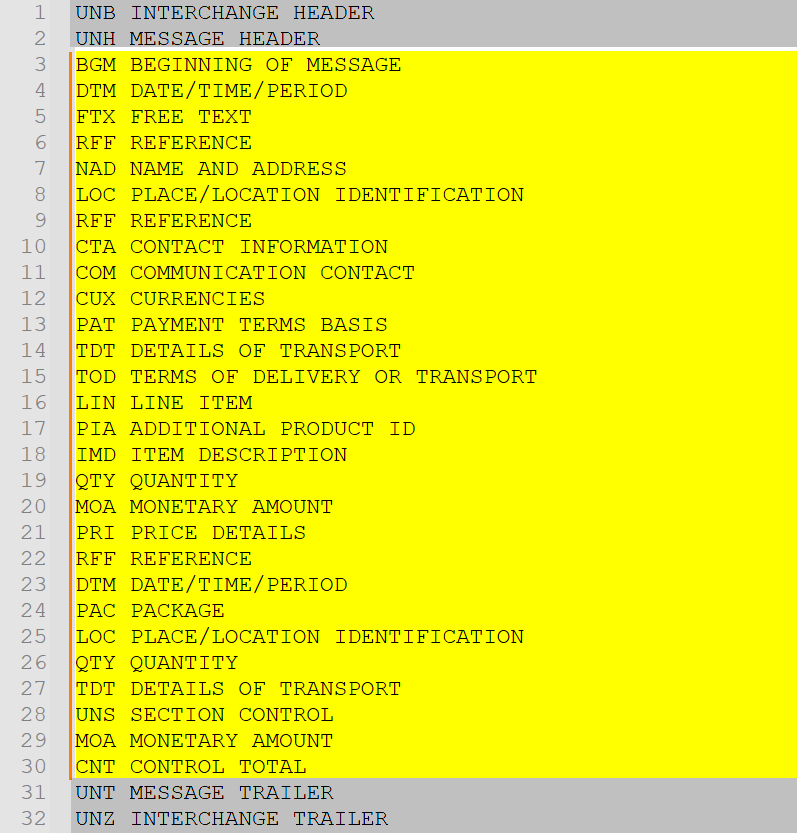
| Segment | Name |
| UNH | Message Header |
| BGM | Beginning of Message |
| DTM | Date/Time/Period |
| NAD | Name and Address |
| RFF | Reference |
| CUX | Currencies |
| LIN | Line Item |
| QTY | Quantity |
| PRI | Price Details |
| UNS | Section Control |
| UNT | Message Trailer |
What are the Common segments of an Odette message?
Common segments include: UNH (Message Header), BGM (Beginning of Message), DTM (Date/Time), NAD (Party Information), LIN (Item), QTY (Quantity), and UNT (Message Trailer).
| Segment | Name |
| UNH | Message Header |
| BGM | Beginning of Message |
| DTM | Dates |
| NAD | Parties |
| LIN | Line Item |
| QTY | Quantity |
| PRI | Price |
| UNT | Message Trailer |
What is the difference between Odette and EDIFACT?
Odette is an automotive industry organization that defines implementation standards and communication frameworks for European automotive supply chains, while EDIFACT is the underlying international EDI syntax standard used to structure many Odette messages. Odette commonly applies automotive-specific business rules and workflows on top of EDIFACT message structures.
What Status Codes are used with an Odette message?
Odette uses codes that represent order acknowledgment, acceptance, modification, or rejection, similar to UN/EDIFACT BGM1225 and X12 BAK02 values.
What Reason Codes are used with an Odette message?
Reason Codes are used to explain order changes or exceptions, such as quantity discrepancies, production delays, or delivery rescheduling.
What use cases does the Odette message workflow support?
• OEM-to-supplier order transmission
• Delivery scheduling (DELINS/DELJIT)
• Invoice and remittance processing (INVOIC/REMADV)
• Sales reporting (SLSRPT)
Why do automotive OEMs use Odette?
Automotive manufacturing environments depend on synchronized production schedules, supplier coordination, shipment sequencing, and inventory visibility to prevent line stoppages and supply chain disruption. Odette standards help maintain manufacturing continuity through standardized, automated communication workflows across multi-tier automotive ecosystems.
What are the Benefits of Odette?
Odette standards improve automotive supply chain coordination by standardizing procurement, scheduling, shipment execution, invoicing, and supplier communication workflows across multi-tier manufacturing ecosystems. Standardized integration improves visibility, operational efficiency, compliance, and manufacturing responsiveness. In term of global standardization for procurement, Odette standards deliver:
- Faster, more accurate order processing
- Improved cross-border compliance
- Reduced errors and disputes
- Improves cross-border trade efficiency
- Enhances supply chain synchronization
- Reduces administrative overhead
- Enables digital transformation for European OEMs
How does Odette support exception management?
Odette workflows help organizations identify schedule variances, shipment discrepancies, inventory inconsistencies, invoice disputes, and supplier delivery exceptions earlier within the automotive supply chain lifecycle. Standardized message orchestration improves operational responsiveness and manufacturing continuity.
How Efficient is Odette?
Modern automotive supply chains require more than document exchange — they require transaction-level execution visibility across orders, schedules, shipments, inventory activity, invoices, and supplier events. PartnerLinQ helps organizations establish an automotive execution control layer that synchronizes Odette, EDIFACT, X12, SAP IDoc, and VDA workflows across global supply chain ecosystems.
Visibility alone does not resolve automotive execution challenges. Organizations must also coordinate schedules, inventory events, shipment activity, supplier responses, invoices, and operational exceptions across multiple standards and enterprise systems in near real time.
How compliant is Odette?
Complies with Odette, UN/EDIFACT, and ISO/UN/CEFACT global data interchange standards. Most automotive trading partners will expect other Odette EDI transactions in response to or following an Odette ORDERS (Purchase Order) message such as:
| Transaction | Purpose | Role |
| ORDERS | Purchase Order | Used to place an order for goods or services. |
| ORDRSP | Order Response | Confirms receipt of the Purchase Order |
| ORDCHG | Order Change | Used to support order changes |
| DESADV | Despatch Advice (ASN) | Describes the contents of the shipment. |
| DELFOR | Delivery Forecast | Used to support supplier delivery schedules and forecasting |
| DELINS | Delivery Instruction | Provides detailed delivery instructions and calls. |
| DELJIT | Delivery Just-in-Time | Used to provide ‘just-in-time’ delivery sequences. |
| INVOIC | Invoice | Used to provide detailed billing for goods or services. |
| RECADV | Receiving Advice | Used to provide receipt and acknowledge the condition of delivered goods in terms of OSD – Over, Short, or Damaged |
| SLSRPT | Sales Report | Used to reports sales data and inventory levels, actual stock quantities tied to those locations. |
What is the format of an Odette message?
Odette messages follow structured EDIFACT-based syntax with defined segments, codes, and qualifiers, supporting XML and flat-file implementations for integration with ERP systems.
How Accurate is an Odette message?
Ensures consistent, auditable communication between automotive trading partners across Europe.
What are the Limitations of an Odette message?
Odette messages are primarily Europe-centric and may require mapping for integration with non-European standards like X12 or VDA.
Are Guidelines & Sample Files for Odette messages available?
Yes, Odette implementation guidelines and samples that support testing and partner onboarding are available through PartnerLinQ. Implementation guides illustrate both inbound and outbound flows, segment layouts, and valid data examples and support testing and partner onboarding.
Companion Guides
Trading partners frequently publish Odette implementation guidelines defining segment usage and validation rules. Customized specification documents for use in on boarding and technical development are available through PartnerLinQ Support and Guideline Management.
Trading Partner Requirements
Trading partners define:
- Required segments
- Frequency expectations
- Identifier standards
Odette Example File (Odette Sample)
What are the Basic Questions for Integrating Odette
- Which Odette message types are mandatory for your OEM?
- Are DELINS and DELJIT both required?
- How are ORDERS and ORDRSP reconciled?
- Are shipment confirmations automated?
- Is invoice exchange (INVOIC) linked to payment (REMADV)?
What Business Level Workflow does the Odette message standard support?
- OEM sends an Odette ORDERS message.
- Supplier confirms via ORDRSP.
- Delivery instructions issued (DELINS/DELJIT).
- Shipment and receipt managed through DESADV and RECADV.
- Invoice sent using INVOIC.
- Payment advice transmitted via REMADV.
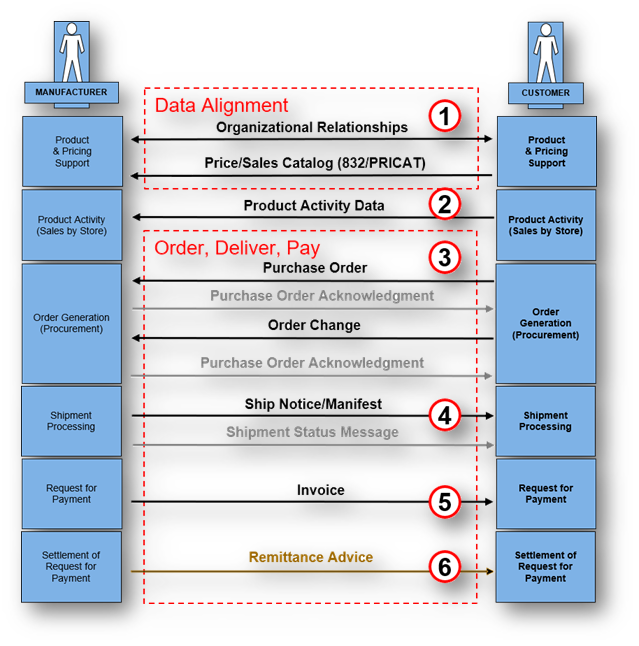
Transaction Lifecycle Visualization Narrative
The Odette transaction lifecycle supports synchronized automotive execution across procurement, forecasting, delivery scheduling, shipment visibility, invoicing, and payment reconciliation. OEMs, suppliers, logistics providers, and manufacturing systems exchange standardized messages continuously to maintain production continuity, inventory accuracy, and supplier alignment.
What are the Best Practices for implementing the Odette message standard?
- Maintain alignment between Odette and EDIFACT versions.
- Automate message translation using PartnerLinQ mappings.
- Use structured codes and qualifiers for automation.
- Exchange acknowledgments (CONTRL/997) to validate transmissions.
- Validate with Odette implementation guidelines regularly.
Appendix: Mapping Table – Odette ↔ X12 ↔ EDIFACT ↔ SAP IDoc
Odette | ANSI X12 | EDIFACT | SAP IDoc |
ORDERS – Purchase Order | 850 – Purchase Order | ORDERS | ORDERS |
ORDRSP – Order Response | 855 – PO Acknowledgment | ORDRSP | ORDRSP |
DELINS – Delivery Instruction | 862 – Shipping Schedule | DELINS | DELFOR |
DELJIT – Delivery Just-in-Time | 862 – Shipping Schedule | DELJIT | DELJIT |
DESADV – Despatch Advice | 856 – Advance Ship Notice | DESADV | DESADV |
INVOIC – Invoice | 810 – Invoice | INVOIC | INVOIC |
RECADV – Receiving Advice | 861 – Receiving Advice | RECADV | RECADV |
REMADV – Payment Advice | 820 – Payment Order | REMADV | REMADV |
SLSRPT – Sales Report | 852 – Product Activity Data | SLSRPT | SLSRPT |
People Also Ask
What industries use Odette EDI?
Odette EDI is primarily used within automotive manufacturing, including OEMs, Tier 1 suppliers, Tier 2 suppliers, logistics providers, and industrial manufacturing organizations operating across European and global supply chains.
Does Odette support Just-in-Time manufacturing?
Yes. Odette standards are widely used to support Just-in-Time (JIT) and Just-in-Sequence (JIS) automotive manufacturing by synchronizing delivery schedules, shipment sequencing, and supplier communication workflows.
Can Odette integrate with SAP?
Yes. Odette messages commonly integrate with SAP IDoc structures including ORDERS, DELFOR, DELJIT, DESADV, and INVOIC workflows to support automotive procurement, scheduling, shipping, and invoicing automation.
Is Odette compatible with ANSI X12?
Yes. Odette workflows are commonly mapped through canonical data models to ANSI X12 transactions such as 850 Purchase Order, 855 Purchase Order Acknowledgment, 856 ASN, and 810 Invoice for global automotive interoperability.
What is a Canonical Data Model?
A canonical data model standardizes how data is structured across EDI, APIs, and enterprise systems. It normalizes information into a consistent format, eliminating point-to-point mappings and reducing complexity. This enables faster onboarding, improved accuracy, and scalable integration across multi-enterprise supply chain environments.
Without a canonical model, integration scales linearly. With it, integration scales exponentially.
The Standards-First Philosophy
A standards-first approach begins with a simple premise, grounding the integration strategy in globally recognized frameworks, including:
- VDA and Odette (automotive ecosystems)
- AIAG (North American automotive)
- UN/EDIFACT (global trade and international commerce)
- ANSI X12 (North America retail, logistics, healthcare)
- SAP IDoc (ERP-native integration)
Why Standardization Matters
Standardization matters because multi-brand, multi-format supply chain ecosystems operate across multiple systems, partners, and regions that require consistent data interpretation. Organizations operating across multiple brands, banners, and divisions face integration sprawl, delays, and errors without it. Standardization enables faster execution, improved visibility, and scalable operations across complex, multi-enterprise environments.
Canonical Data Models: The Core of the Standards-First Approach
A standards-first integration approach helps organizations normalize and orchestrate transactions across X12, EDIFACT, Odette, VDA, APIs, and ERP environments without creating rigid point-to-point dependencies. This improves scalability, accelerates onboarding, simplifies interoperability, and supports long-term automotive supply chain modernization.
The canonical data model sits at the center of the standards-first architecture, a canonical model standardizes how data is structured internally, regardless of source, method, destination, or formatting
- Source system (ERP, WMS, TMS)
- Communication method (EDI, API)
- External format (X12, EDIFACT, Odette, VDA, IDoc)
The Strategic Value of Canonical Normalization
Canonical normalization ensures that all inbound and outbound transactions pass through a unified structure, enabling consistent interpretation and execution across the supply chain lifecycle.
- Eliminates point-to-point mapping
- Reduces transformation complexity
- Accelerates partner onboarding
- Enables consistent analytics and AI readiness
#PartnerLinQInsight
#ExplorePartnerLinQ
#LearnEDI



Explore Our Integration Solutions

PartnerLinQ Integration Solutions
Connect Everything. Integrate Intelligently.
Future-Proof Your Business with Composable, AI Powered Connectivity.