
What is EDIFACT ORDERS?
EDIFACT ORDERS is the global electronic purchase order message used to transmit structured order data between buyers and suppliers. It standardizes procurement across international supply chains by replacing manual processes with automated, secure, and system-integrated transactions.
EDIFACT ORDERS is defined and maintained by the United Nations Economic Commission for Europe (UNECE) under the UN/EDIFACT standard. PartnerLinQ aligns with D96A specifications and implements trading partner–specific guidelines to ensure compliance, interoperability, and execution accuracy across global supply chains.
Transaction Identity Block
Attribute | Description |
Transaction Name | Purchase Order Message |
EDIFACT Message | ORDERS |
Version | D96A |
Functional Group | N/A (EDIFACT Message Type) |
Industry Usage | Retail, Manufacturing, Automotive, Logistics, Healthcare |
Primary Purpose | Initiate procurement by transmitting structured purchase order data |
Typical Sender | Buyer (Retailer, Distributor, Manufacturer) |
Typical Receiver | Supplier, Manufacturer, Distributor |
Common Preceding Transactions | Forecast (DELFOR), Price Catalog (PRICAT), Contract |
Common Following Transactions | ORDRSP, DESADV, INVOIC, CONTRL |
Standard Version | UN/EDIFACT D96A |
What Is the EDIFACT ORDERS?
EDIFACT ORDERS is the global standard electronic purchase order message used to request goods or services between trading partners. It replaces manual procurement processes with structured, secure, and automated communication across international supply chains.
What Does the EDIFACT ORDERS Do?
EDIFACT ORDERS initiates the purchase-to-pay lifecycle by transmitting order intent, product details, pricing, delivery requirements, and commercial terms from buyer to supplier. It enables consistent, machine-readable procurement execution across systems and geographies.
What is EDIFACT ORDERS used for?
EDIFACT ORDERS is used to electronically transmit purchase orders from buyers to suppliers, enabling automated procurement, accurate order processing, and integration across ERP and supply chain systems. It supports global trade by standardizing how order data is exchanged between trading partners.
Who Uses the EDIFACT ORDERS?
Role | Usage |
Retailers | Place replenishment and direct-to-consumer orders |
Manufacturers | Procure raw materials and components |
Distributors | Manage wholesale and fulfillment orders |
Logistics Providers | Coordinate fulfillment and routing |
Healthcare Providers | Order medical supplies and pharmaceuticals |
When Is the EDIFACT ORDERS Required?
EDIFACT ORDERS is required whenever a buyer initiates a formal purchase request under an agreed trading relationship, particularly in automated or high-volume procurement environments.
Is the EDIFACT ORDERS Mandated Under Regulation?
EDIFACT ORDERS is not universally mandated but is widely required by trading partner agreements, industry frameworks, and cross-border trade compliance standards.
How Does the EDIFACT ORDERS work?
The EDIFACT ORDERS works by sending a structured purchase order from a buyer’s system to a supplier’s system using standardized segments such as BGM, NAD, LIN, QTY, and PRI. The supplier processes the order and responds with ORDRSP, DESADV, and INVOIC to complete the transaction lifecycle.
Upstream Transactions
DELFOR - Provides forecast demand
PRICAT - Defines pricing and catalog structure
Downstream Transactions
ORDRSP - Confirms or modifies order
DESADV - Provides shipment details
INVOIC - Finalizes billing
CONTRL - Confirms syntax validation
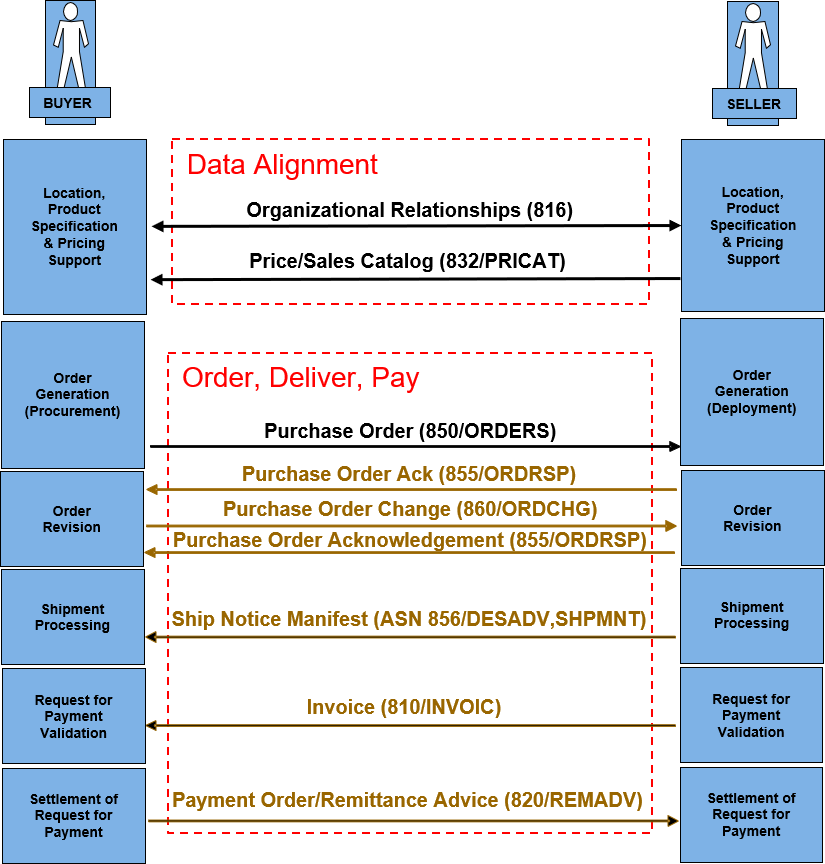
End-to-End Workflow Example
- Buyer creates purchase order in ERP
- Order is translated into EDIFACT ORDERS
- Transmission occurs via AS2, SFTP, or VAN
- Supplier validates and responds with ORDRSP
- Shipment executed with DESADV
- Invoice issued via INVOIC
Industry-Specific Workflow Variations
- Retail - Drop-ship and omnichannel fulfillment
- Automotive - JIT and sequenced delivery
- Healthcare - Compliance-driven procurement
- Logistics - Multi-leg and cross-dock routing
Cross-Standard Canonical Mapping
X12 | EDIFACT | Role |
850 | ORDERS | Purchase Order |
855 | ORDRSP | Order Response |
856 | DESADV | Advance Ship Notice |
810 | INVOIC | Invoice |
Canonical Model Structure (Execution Architecture)
Canonical data mapping enables EDIFACT ORDERS, X12 850, and SAP IDoc ORDERS05 to operate within a unified execution model. This eliminates redundant transformations, accelerates partner onboarding, and ensures consistent transaction-level visibility across hybrid EDI and API environments.
Canonical Purchase Order Model

│
├── Header
│   ├── order_id
│   ├── order_date
│   ├── buyer_id
│   ├── supplier_id
│   └── currency
│
├── Line Items
│   ├── line_id
│   ├── product_id
│   ├── quantity
│   ├── unit_price
│   └── description
│
├── Logistics
│   ├── ship_to
│   ├── transport_mode
│   └── delivery_terms
│
└── Financials
    ├── total_amount
    ├── line_amount
    └── payment_terms
Is EDIFACT ORDERS the same as EDI 850?
EDIFACT ORDERS is the international equivalent of the ANSI X12 850 purchase order. Both serve the same purpose but differ in structure, syntax, and regional adoption, with ORDERS used globally and 850 primarily used in North America.
Comparison Tables (ORDERS vs 850 vs ORDCHG)
What is the difference between EDIFACT ORDERS and X12 850?
EDIFACT ORDERS and X12 850 both represent purchase orders, but ORDERS is used globally under the UN/EDIFACT standard, while 850 is used primarily in North America under ANSI X12. They differ in syntax, structure, and segment naming but serve the same business purpose.
EDIFACT ORDERS vs X12 850 (Primary SERP Target)
Attribute | EDIFACT ORDERS | X12 850 |
Standard | UN/EDIFACT | ANSI X12 |
Geography | Global | North America |
Purpose | Purchase Order | Purchase Order |
Structure | Segment Groups | Loops |
Header | UNH | ST |
Order Control | BGM | BEG |
Parties | NAD | N1 |
Line Items | LIN | PO1 |
Pricing | PRI | PO1/CTP |
Totals | MOA/CNT | TDS/CTT |
Flexibility | High (cross-border) | High (domestic) |
PartnerLinQ Role | Canonical normalization layer | Same (translated) |
ORDERS vs ORDCHG (Change Management)
Attribute | ORDERS | ORDCHG |
Purpose | Create order | Modify existing order |
Trigger | New demand | Change request |
Key Segment | BGM+220 | BGM+230 |
Use Case | Initial PO | Quantity, price, or date updates |
Risk | Low | Requires synchronization |
ORDERS vs ORDRSP (Confirmation)
Attribute | ORDERS | ORDRSP |
Direction | Buyer → Supplier | Supplier → Buyer |
Purpose | Request goods | Confirm or reject |
Dependency | Initiates workflow | Responds to ORDERS |
Visibility | Demand signal | Supply confirmation |
Full Lifecycle Table (Combined View)
Stage | X12 | EDIFACT | Operational Role |
1 | 850 | ORDERS | Purchase Order |
2 | 855 | ORDRSP | Order Acknowledgment |
3 | 860 | ORDCHG | Order Change |
4 | 856 | DESADV | Shipment Notice |
5 | 810 | INVOIC | Invoice |
6 | 997 | CONTRL | Acknowledgment |
Visual Lifecycle Diagram (ORDERS → ORDRSP → DESADV → INVOIC)
Order-to-Cash Lifecycle (EDIFACT + Cross-Standard Alignment)
Buyer System (ERP/OMS)
        │
        │ 1. Purchase Order
        ▼
   EDIFACT ORDERS
   (X12 850 Equivalent)
        │
        │──────────────────────────────────────────────►
        │                                               Supplier System
        │
        │ 2. Order Response
        ◄──────────────────────────────────────────────
        │     EDIFACT ORDRSP (X12 855)
        │
        │ 3. Shipment Execution
        ◄──────────────────────────────────────────────
        │     EDIFACT DESADV (X12 856)
        │
        │ 4. Financial Settlement
        ◄──────────────────────────────────────────────
        │     EDIFACT INVOIC (X12 810)
        │
        ▼
   Buyer Receives Goods + Invoice
Lifecycle Table (Execution-Control Perspective)
Stage | EDIFACT | X12 Equivalent | System Event | Execution Control Layer Role |
1 | ORDERS | 850 | Order Created | Normalize + route transaction |
2 | ORDRSP | 855 | Supplier Confirmation | Validate acceptance/rejection |
3 | DESADV | 856 | Shipment Notification | Track fulfillment + visibility |
4 | INVOIC | 810 | Invoice Issued | Reconcile financials |
5 | CONTRL | 997 | Acknowledgment | Ensure message integrity |
Operational Insight (Snippet-Ready)
EDIFACT ORDERS initiates the purchase-to-pay lifecycle, followed by ORDRSP for confirmation, DESADV for shipment visibility, and INVOIC for billing. Together, these transactions create a synchronized, end-to-end execution flow that enables real-time coordination between buyers and suppliers across global supply chains.
Industry Workflow Variations (Lifecycle Adaptation)
Retail - Drop-ship and omnichannel fulfillment
Automotive - JIT sequencing tied to production schedules
Grocery - High-frequency replenishment cycles
Healthcare - Compliance-driven procurement validation
Logistics - Multi-leg shipment orchestration
How does EDIFACT ORDERS work?
EDIFACT ORDERS works by transmitting a structured purchase order from a buyer’s system to a supplier’s system using standardized segments such as BGM, NAD, LIN, QTY, and PRI. The supplier processes the order and responds with transactions like ORDRSP, DESADV, and INVOIC, completing the purchase-to-pay lifecycle.
How does PartnerLinQ use the ORDERS?
PartnerLinQ positions ORDERS as a transactional execution control layer, orchestrating procurement workflows across ERP, OMS, and partner ecosystems. It enables:
- Canonical data normalization
- Real-time visibility into order lifecycle
- Multi-network partner connectivity
- Seamless EDIFACT ↔ X12 translation
Where Is the EDIFACT ORDERS Used?
EDIFACT ORDERS is used globally across:
- Retail and eCommerce
- Manufacturing and automotive
- Logistics and transportation
- Healthcare supply chains
Are there Industry-Specific Responses to the EDIFACT ORDERS?
Yes. Responses vary by industry but commonly include:
- ORDRSP (confirmation or change)
- DESADV (shipment visibility)
- INVOIC (financial settlement)
- CONTRL (technical acknowledgment)
What Is the Purpose, Key Features, and Business Use Cases of the EDIFACT ORDERS?
Operational Purpose
Standardize procurement communication across trading partners.
Key Features
- Structured global standard (UN/EDIFACT D96A)
- Supports multiple order types (blanket, direct-ship, recurring)
- Enables automation and system integration
- Supports multi-party and multi-location delivery
Business Use Cases
- International Procurement - Cross-border order execution
- Drop Ship - Direct-to-consumer fulfillment
- Blanket Orders - Scheduled replenishment
- Multi-location Delivery - Complex distribution networks
What Information Is Required in the EDIFACT ORDERS?
An EDIFACT ORDERS message requires buyer and supplier identifiers, purchase order number, order date, product details, quantities, pricing, delivery instructions, and payment terms. These elements ensure accurate order execution, validation, and integration across ERP and supply chain systems.
Data Category | Description | Key Segments |
Order Identification | Unique purchase order number and type (original/change/cancel) | BGM |
Dates | Order date, delivery date, and scheduling details | DTM |
Parties | Buyer, supplier, and delivery locations | NAD, LOC |
Product Identification | Item numbers (SKU, GTIN, supplier part numbers) | LIN, PIA |
Quantities | Ordered quantities and units of measure | QTY |
Pricing | Unit price and pricing conditions | PRI |
Currency | Transaction currency and exchange rate | CUX |
Payment Terms | Payment conditions and due dates | PAT |
Delivery Terms | Shipping method, Incoterms, and routing | TOD, TDT |
References | Contract numbers, agreements, or related documents | RFF |
What data is included in an EDIFACT ORDERS message?
An EDIFACT ORDERS message includes buyer and supplier identifiers, purchase order number, order date, product details, quantities, pricing, delivery instructions, payment terms, and transport information. These elements ensure accurate order execution and downstream processing.
What segments are used in EDIFACT ORDERS?
Key EDIFACT ORDERS segments include UNH (header), BGM (order details), DTM (dates), NAD (parties), LIN (line items), QTY (quantities), PRI (pricing), and UNT (trailer). These segments define the structure and content required to execute a purchase order transaction.
Quick Segment Reference
Segment | Purpose |
UNH | Message header |
BGM | Order identification |
DTM | Dates |
NAD | Parties |
LIN | Line items |
QTY | Quantities |
PRI | Pricing |
UNT | Message trailer |
Required Segments
Segment | Requirement | Description |
UNH | Mandatory | Message identification |
BGM | Mandatory | Order number and function |
DTM | Mandatory | Order date |
NAD | Mandatory | Buyer and seller |
LIN | Mandatory | Line item |
UNT | Mandatory | Message closure |
Optional Segments
Segment | Description |
FTX | Free text (not recommended for automation) |
PIA | Additional product identifiers |
IMD | Item description |
PAC | Packaging |
LOC | Delivery locations |
Required Identifiers
- Purchase Order Number
- Buyer and Supplier IDs (GLN recommended)
- Product Identifiers (SKU, GTIN)
Required Dates
- Order Date (DTM)
- Delivery Date or Window
Required Financial Data
- Unit Price (PRI)
- Line Amount (MOA)
- Currency (CUX)
Summary Table of Key Segments
Segment | Function | Business Role |
UNH | Message Header | Controls transaction identity |
BGM | Beginning of Message | Defines order type (original/change/cancel) |
DTM | Date/Time | Establishes timing |
NAD | Name & Address | Identifies trading parties |
LIN | Line Item | Defines ordered products |
QTY | Quantity | Specifies order volume |
PRI | Price | Defines cost structure |
UNS | Section Control | Separates detail and summary |
CNT | Control Total | Validates totals |
UNT | Trailer | Closes message |
What Status and Reason Codes Are Used with the EDIFACT ORDERS?
Status Codes
When BGM030 = 9 - Original Order, when BGM030 = 1 – Cancellation, and when BGM030 = 4 – a Change is indicated-
Reason Codes
Reason codes are found in various segments of the EDIFACT ORDERS document, in the RFF for Reference-based reasons and in the DTM for timing-related adjustments.
What are the Benefits of the ORDERS?
Operational Benefits
- Faster order processing
- Reduced manual errors
- Improved supplier coordination
Financial Benefits
- Accurate pricing and invoicing
- Reduced disputes
Compliance Benefits
- Alignment with global EDIFACT standards
What are the Benefits of Automating the EDIFACT ORDERS?
Category | Benefit | Impact |
Automation | Eliminates manual entry | Reduces cost and errors |
Visibility | Real-time tracking | Improves decision-making |
Integration | ERP connectivity | Accelerates execution |
Scalability | Multi-partner support | Enables growth |
Are there Regulatory and Compliance Requirements for the EDIFACT ORDERS?
ORDERS aligns with UN/EDIFACT standards and supports international trade compliance, including customs and cross-border documentation requirements.
EDIFACT ORDERS Technical Structure, Format, and Versions
What is the structure of an EDIFACT ORDERS message?
EDIFACT ORDERS follows a three-part structure consisting of a header (UNH, BGM, DTM, NAD), a detail section (LIN, QTY, PRI), and a summary section (UNS, MOA, CNT, UNT). This structure ensures consistent message validation and processing across systems.
Hierarchical Loop Structure
Level | Description |
Header | UNH, BGM, DTM, NAD |
Detail | LIN, QTY, PRI |
Summary | UNS, MOA, CNT, UNT |
File Format and Delimiters
PartnerLinQ uses UNA service string:
Component | Value |
Component Separator | : |
Data Element Separator | + |
Decimal | . |
Release Character | ? |
Segment Terminator | ' |
What are the Limitations of the ORDERS?
Version or Companion Guide Constraints
Trading partner-specific variations may require customization.
Jurisdiction-Specific Requirements
Localization needed for regulatory compliance.
Timing and Frequency Limitations
Batch-oriented processing may limit real-time responsiveness.
Are Implementation Guidelines and Sample Files Available for the EDIFACT ORDERS?
Yes. PartnerLinQ provides sample transactions and implementation guides. EDIFACT ORDERS implementation guides illustrate both inbound and outbound flows, segment layouts, and valid data examples and support testing and partner onboarding.
Companion Guides
Trading partners frequently publish EDIFACT ORDERS implementation guidelines defining segment usage and validation rules. Customized specification documents for use in on boarding and technical development are available through PartnerLinQ Support and Guideline Management.
What does an EDIFACT ORDERS example look like?
An EDIFACT ORDERS example includes a structured message starting with UNH (header), followed by BGM (order identification), NAD (buyer and supplier), LIN (line items), QTY (quantities), and PRI (pricing), and ending with UNT (message trailer) to complete the transaction.
ORDERS Sample File
UNA:+.? '

UNB+UNOC:3+BUYERGLN+SUPPLIERGLN+250101:1200+000000001'

UNH+0001+ORDERS:D:96A:UN'

BGM+220+PO123456+9'

DTM+137:20250101:102'

RFF+ON:PO123456'

NAD+BY+1234567890123::9'

NAD+SU+9876543210987::9'

CUX+2:USD:9'

PAT+1'

LIN+1++123456789:EN'

PIA+1+SKU12345:BP'

IMD+F++:::Product Description'

QTY+21:100'

PRI+AAA:10.50'

UNS+S'

MOA+9:1050'

CNT+2:1'

UNT+15+0001'

UNZ+1+000000001'
Annotated ORDERS Sample File
Segment | Example | Description | Business Role |
UNA | UNA:+.? ' | Defines delimiters | Controls parsing |
UNB | UNB+... | Interchange header | Identifies sender/receiver |
UNH | UNH+0001+ORDERS:D:96A:UN | Message header | Starts transaction |
BGM | BGM+220+PO123456+9 | Purchase order number and type | Defines original/change/cancel |
DTM | DTM+137:20250101:102 | Order date | Establishes timing |
RFF | RFF+ON:PO123456 | Reference number | Links to business documents |
NAD | NAD+BY / NAD+SU | Buyer/Supplier | Identifies parties |
CUX | CUX+2:USD:9 | Currency | Defines financial context |
PAT | PAT+1 | Payment terms | Defines settlement conditions |
LIN | LIN+1++123456789:EN | Line item | Identifies product |
PIA | PIA+1+SKU12345:BP | Additional ID | Cross-referencing |
IMD | IMD+F... | Description | Human-readable item detail |
QTY | QTY+21:100 | Quantity | Order volume |
PRI | PRI+AAA:10.50 | Price | Unit cost |
UNS | UNS+S | Section control | Separates detail/summary |
MOA | MOA+9:1050 | Monetary amount | Total value |
CNT | CNT+2:1 | Control count | Validation |
UNT | UNT+15+0001 | Trailer | Ends message |
UNZ | UNZ+1+000000001 | Interchange trailer | Closes interchange |
Trading Partner Requirements
Customized mapping, testing, and validation documentation are also available. Partners may specify:
- Mapping
- Identifier use (standards)
- Validation rules
- Response rules
What are the more common EDI errors and rejection scenarios for the ORDERS?
Category | Mistake | Impact |
Structure | Missing UNH/UNT alignment | Rejections |
Data | Invalid product IDs | Processing failures |
Mapping | Incorrect LIN ↔ PO1 mapping | Data inconsistency |
Timing | Missing delivery dates | Fulfillment delays |
Structural Errors
- Missing mandatory segments (UNH, BGM, UNT)
Data Validation Errors
- Invalid product identifiers
- Incorrect pricing formats
Identifier Mismatch Errors
- Buyer/Supplier ID inconsistencies
Version Compliance Errors
- Incorrect D96A formatting
Industry-Specific Rejections
- Missing delivery or compliance data
What are the Basic Questions for EDI Integration with the ORDERS?
- Are there Samples and Specs available?
- What is the general direction of the transaction?
- Is the ORDERS transaction inbound or outbound?
- Are inbound or outbound orders also required?
- What connectivity method is used (AS2, VAN)?
- Are AS2, VAN, or SFTP connections used?
- Are more than one trading partner exchanging the [Transaction ID]?
- Are there other interested parties?
- What trading partner requirements apply?
- What version is supported?
- What other transactions might these interested parties be a party to?
- What response to the [Transaction ID] is expected or sent?
- Is a response to [Transaction ID] a timed event? Are notifications involved/needed?
- What system generates the response?
- What response time is contractually required?
- Are there samples and specs of the response transaction available?
- Are changes (ORDCHG) supported?
- How are delivery locations handled?
- Are pricing and SAC charges included?
- What validation rules apply?
- How are changes to the [Transaction ID] business message managed today?
- Is there automation? (an internal system trigger) or are [Transaction ID] business message transactions triggered manually?
- How is automation managed (manual vs. system-triggered)?
- Are responses and changes automatically triggered? (an internal systems trigger)
- Are alerting systems configured for missed response deadlines?
- Do transactions require human intervention?
- What systems generate or consume the transaction?
- How are changes to the business message managed today?
- How are one-time addresses handled in ERP?
- Are SKU or UPC identifiers used?
- What identifiers are required (SKU, UPC, GTIN)?
- What testing process is required?
- What validation rules must be applied?
What are the Best Practices for using the ORDERS?
Category | Best Practice | Business Impact |
Identification | Use GLN and GTIN | Improves accuracy |
Validation | Validate references (RFF) | Reduces errors |
Automation | Automate mapping | Improves efficiency |
Compliance | Include INCO and payment terms | Ensures alignment |
What Transactions are associated with the ORDERS?
Stage | Transaction | Role |
1 | ORDERS | Purchase Order |
2 | ORDRSP | Order Response |
3 | DESADV | Shipment Notice |
4 | INVOIC | Invoice |
5 | CONTRL | Acknowledgment |
What is the difference between ORDERS and ORDCHG?
ORDERS creates a new purchase order, while ORDCHG modifies an existing one. ORDCHG is used to update quantities, delivery dates, or pricing after the original order has been issued but before fulfillment is complete.
FAQs
What is EDIFACT ORDERS?
EDIFACT ORDERS is the global electronic purchase order standard used to transmit structured procurement data between trading partners.
Is ORDERS the same as EDI 850?
ORDERS is the EDIFACT equivalent of the X12 850 purchase order.
What segments are required in ORDERS?
Core segments include UNH, BGM, DTM, NAD, LIN, QTY, PRI, and UNT.
What industries use ORDERS?
Retail, manufacturing, logistics, automotive, and healthcare all rely on ORDERS for procurement.
People Also Ask About EDIFACT ORDERS
What is the purpose of EDIFACT ORDERS?
EDIFACT ORDERS is used to initiate purchase transactions by transmitting structured order data between buyers and suppliers.
What is the difference between ORDERS and ORDRSP?
ORDERS creates a purchase order, while ORDRSP confirms, modifies, or rejects it.
Is EDIFACT ORDERS required for compliance?
ORDERS is not universally mandated but is often required by trading partner agreements and international trade standards.
What systems use EDIFACT ORDERS?
ERP, OMS, WMS, and supply chain platforms use ORDERS to automate procurement workflows.
Footnotes
- EDIFACT ORDERS Completed Document
- PartnerLinQ ORDERS EDIFACT vD96A Specification Document



Explore Our Integration Solutions

PartnerLinQ Integration Solutions
Connect Everything. Integrate Intelligently.
Future-Proof Your Business with Composable, AI Powered Connectivity.